

Two Shopify stores. Same plan, same products, same $50,000 a month in sales. One of them pays about $1,000 more in fees every month, and nobody on the team notices, because it never arrives as a bill. It just comes out of every payout. The difference sits in one setting: which provider processes the checkout, and whether Shopify Payments is switched on.
There's a popular belief that bringing your own payment processor is the way to save on fees. On Shopify in the US, it usually works the other way around.
Below we break down Shopify Payments fees plan by plan, explain the third-party transaction fee (including the exceptions most merchants miss), and run the numbers on when another gateway actually pays off.
What Shopify Payments is and what your customers see at checkout
Shopify Payments is Shopify's built-in payment processor. You turn it on in your admin, verify your business, and start accepting payments without a separate merchant account. It has run on Stripe's infrastructure since the two companies partnered in 2013, which is why for most US stores "Stripe or Shopify Payments" is less of a choice than it sounds.
In the US, Shopify Payments covers the methods American shoppers actually use (Shopify's full list):
- Cards – Visa, Mastercard, American Express, Discover and Diners Club;
- Accelerated checkouts – Shop Pay, Apple Pay and Google Pay, turned on automatically;
- PayPal Wallet – built into Shopify Payments for US merchants, so PayPal transactions, payouts and disputes live in your Shopify admin (how it works);
- Shop Pay Installments – pay-over-time through Affirm for orders from $35 to $30,000, with Affirm taking on the credit risk (details).
Payouts typically reach your bank account within 3 to 5 business days, and payments captured Friday through Sunday arrive as a single payout (payout rules). Brand-new stores wait a little longer at first, until they have a track record of fulfilling orders.
Shopify Payments fees by plan
Every online card payment costs a percentage of the order plus 30 cents. The percentage depends on your plan, and so does one more fee that we'll get to in a moment. Here's the current US rate card from Shopify's pricing page, as of September 2026.
A few fees don't show up in that table but are worth knowing before you do your budget:
- Currency conversion – 1.5% when you accept payments in a currency other than your payout currency, or 3% for PayPal Wallet payments (fees and costs);
- Chargebacks – $15 per dispute, returned to you if you win (chargeback process);
- Shop Pay Installments – has its own merchant rate, separate from standard card processing, and that fee isn't returned if the order is refunded. Check the current rate in your admin before switching it on.
For plan prices and how fees add up over a full year, see our Shopify pricing breakdown.
What that looks like on a $75 order
On the Basic plan, a single $75 order costs you:
- US card – $2.48;
- International card – $3.23;
- PayPal Wallet – $3.11.
Per order, those are small numbers. At a few hundred orders a month, the gap between a domestic card and PayPal becomes a line in your budget worth watching, especially if your average order is on the low side.
The third-party transaction fee (and the exceptions most merchants miss)
If you connect a payment provider other than Shopify Payments, Shopify adds its own fee on top of whatever that provider charges: 2% on Basic, 1% on Grow, 0.6% on Advanced and 0.2% on Plus. It applies even when Shopify Payments is also active. And it isn't returned when you refund an order (Shopify's rules).
That's the part most people know. The exceptions are where it gets interesting:
- PayPal – with Shopify Payments activated, PayPal payments are excluded from the fee (PayPal integrations);
- Manual payments – cash on delivery, bank deposits, checks and draft orders marked as paid don't carry the fee;
- In-person sales – POS orders are excluded too;
- Shopify Plus – the biggest one.

Stores on the Shopify Plus plan that use Shopify Payments as the primary gateway will have third-party transaction fees waived for all other payment methods used, including all PayPal integrations.
In other words, on Plus you can keep Shopify Payments as your main processor and add a specialized provider next to it without paying Shopify anything extra.
Shopify Payments vs a third-party gateway: the math
Let's compare Shopify Payments with Authorize.net, a common alternative for US merchants, on its standard All-in-One pricing: 2.9% + 30¢ per transaction plus $25 a month. On top of that comes Shopify's third-party fee. Here's the same $75 order on each plan, without the monthly fee:
And at the scale of a month? Take a store doing $50,000 in card sales: 500 orders of $100.
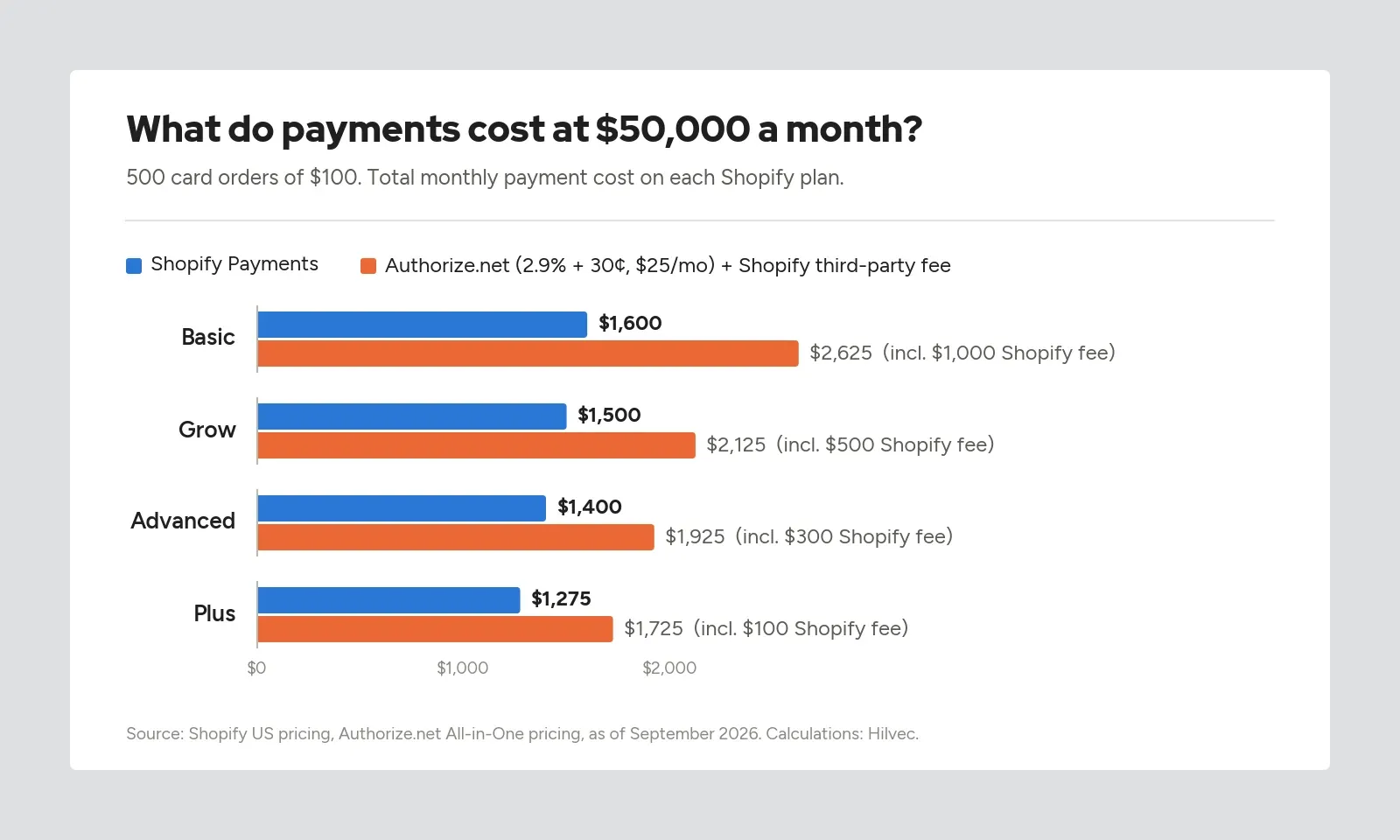
On Basic, the difference is $1,025 a month, which adds up to more than $12,000 a year. It shrinks as you move up the plans, but it never disappears: even on Plus you're $450 a month worse off. The reason is simple. In the US, standard third-party rates start roughly where Shopify Payments' Basic rate is, so there's nothing left to offset Shopify's fee.
That's not true everywhere, by the way. In some European markets, local processors are cheap enough that a third-party gateway can come out ahead on the higher plans. In the US, you'd need a negotiated rate to get there.
When a third-party gateway still makes sense
None of this means Shopify Payments is right for every store. There are situations where another provider is the better choice, or the only one:
- You're not eligible for Shopify Payments – businesses selling regulated products like cannabis, firearms or tobacco, some financial services, adult content or gambling can't use it (eligibility rules), so a third-party provider is the way to go;
- You've negotiated custom pricing – high-volume merchants can sometimes get interchange-plus rates from a processor that beat Shopify's rate card by more than the third-party fee;
- Your processor is tied into your finance stack – if one provider handles your stores, marketplaces and retail locations and feeds your ERP, switching may cost more in operations than it saves in fees;
- You're on Plus – with Shopify Payments as the primary gateway, adding a second provider for a specific payment method costs you nothing extra in Shopify fees.
Keep the checkout clean
Every extra payment provider adds another option to your checkout. It's easy to end up with PayPal showing twice, once through PayPal Wallet in Shopify Payments and once through a separate PayPal Express integration, or with a provider that sends customers to another site and back.
A few rules we follow when setting up payments for clients:
- don't duplicate methods – one PayPal integration, one card processor;
- keep the list short – five payment buttons make the choice harder, not the offer better;
- test the full flow on a phone, including the return from any external payment page to your order confirmation;
- test refunds for every provider before the first return request comes in.
Who can use Shopify Payments in the US
Most US businesses qualify, from individuals and sole proprietors to LLCs, partnerships, corporations and nonprofits (US requirements). A few details tend to trip people up during verification:
- SSN or ITIN is always required – even if you sign up as a registered company with an EIN;
- The payout account must be a US checking account in USD that accepts ACH transfers; savings accounts and wire-only accounts don't qualify;
- Individuals and sole proprietors must live in the US;
- ID documents must be original photos, not scans or screenshots, and your name and date of birth must match them exactly.
For Shopify Payments sales, Shopify also takes care of Form 1099-K reporting, which is one less thing to chase at tax time.
Which setup we'd recommend
There's no single configuration that fits every store. There are, however, a few setups that work for most of them.
Just starting out
Shopify Payments with Shop Pay, Apple Pay, Google Pay and PayPal Wallet. That covers the vast majority of US shoppers, keeps every payout and dispute in one admin, and means you never pay the third-party fee.
Growing store
Stay on Shopify Payments. If your average order is high, consider turning on Shop Pay Installments, since pay-over-time can make a $400 purchase feel like a $100 one. And once your revenue grows, run the numbers on upgrading your plan: lower card rates on Grow and Advanced can cover the higher subscription faster than you'd expect. We walk through that calculation in our Shopify pricing guide.
Selling internationally
Shopify Payments is close to a must here. Showing prices in local currencies requires it (Shopify's rules), and orders paid through third-party providers are processed in your store's default currency. Just budget for the extras: +1% on international cards and 1.5% on currency conversion.
When Shopify Payments won't work
If you're not eligible, or your negotiated processor rate beats Shopify's by more than the third-party fee, go with a third-party provider. At that volume, it's also worth looking at Shopify Plus, where keeping Shopify Payments as your primary gateway removes the fee on everything else.
Shopify Payments fees in practice – how we approach it as a technology partner
Payments are the least glamorous part of a store and one of the most important. Nobody remembers a nice "Pay now" button. People do remember not being able to pay the way they wanted.
When we set up payments for clients, we start with numbers, not with a list of logos: average order value, where customers come from, how they've paid so far, which plan the store is on. During migrations, for example from WooCommerce to Shopify, we regularly find stores running several gateways, one of which handles a sliver of orders while quietly adding fees. Then we design the checkout so the choice of payment method is obvious, and we test every path with real transactions. Payment settings, by the way, should only be in the hands of people who need them, and our guide to Shopify login and staff access covers how to set that up.
Sometimes the recommendation is short: Shopify Payments, PayPal Wallet, done. Sometimes it's Shopify Payments plus a financing option, because without it the store loses its biggest orders. Both answers are good ones, as long as there are numbers behind them.
If you'd like a second pair of eyes on your payment setup, take a look at our Shopify agency page and let's talk. No pressure, just the math.