

At some point, Shopify starts to feel like a jacket that's one size too small. The store sells, the campaigns deliver, and yet something keeps pinching: a checkout you can't shape the way you need, team workflows that turn manual and tiring, and that quiet worry before every big launch. That's usually when Shopify Plus enters the conversation.
Let's start with the number that tends to cool things down: Shopify Plus starts at $2,300 a month. The second number is more interesting. At current US rates, lower processing fees alone only cover that subscription once a store is doing hundreds of thousands of dollars a month, and on card payments they practically never do.
So if it's not the fees, what is it? Below we take Plus apart: what it really costs, what you get compared with Advanced, and how to tell whether your store has actually outgrown the standard plans.
What Shopify Plus is (and what it isn't)
Shopify Plus is Shopify's top plan, built for large and fast-growing stores. It isn't a separate platform or a different system. It's the same admin, the same themes and the same engine, with broader permissions, higher limits and a contract with Shopify instead of a standard subscription.
In practice, the difference comes down to control. Standard Shopify sets boundaries on purpose: a locked checkout, a capped number of staff accounts, one store. For most businesses that's a good call, because less freedom means fewer ways to break things. Plus moves those boundaries to where sales need to fit operations, the team and scale.
Brands like Glossier, Staples and Sony run on Plus, but you don't need to be a household name to consider it. You just need the standard limits to start costing you real money.
How much does Shopify Plus cost in 2026?
Shopify Plus is priced by contract length. In the US it's billed in dollars; in other markets Shopify bills in local currency. Here's where things stand in September 2026, according to Shopify's Plus plan documentation and the US pricing page.
Outside the US, the same plan costs €2,100 or £1,800 a month on a three-year term (€2,250 or £1,950 on a one-year term).
The flat subscription isn't the whole story. At very high volume, Shopify switches to a variable platform fee, a percentage of your revenue. The public pricing page doesn't list the rate, but Shopify partners put it at around 0.35–0.4% of online revenue. The mechanism is simple: you pay the flat fee until the percentage would be higher. At those rates, that happens somewhere around $625,000–$660,000 in monthly sales.
One contract covers one brand. If your company runs several brands, each needs its own Plus contract. Expansion stores are meant for the same brand in different markets or channels.
For comparison, Advanced, the top standard plan, costs $299 a month billed yearly or $399 billed monthly. We break down every plan and fee in our Shopify pricing guide.
Shopify Plus vs Advanced: what you get for the extra cost
Advanced is the natural benchmark, because that's the plan most companies move to Plus from. The subscription gap is about $2,000 a month. Here's what's actually behind it.
A few rows in that table make the biggest difference day to day.
Checkout on your terms
On the standard plans, checkout is locked. You can change the logo and colors and add apps to the thank-you page, but the information, shipping and payment steps stay the way Shopify designed them. On Plus, you can extend every step of checkout with your own fields, messages, validation or an extra offer. Add custom apps built on Shopify Functions, and you can also change the logic behind discounts, shipping and payment methods.
If you come across older guides about Shopify Scripts or editing checkout.liquid, treat them as history. Scripts stopped running on June 30, 2026, and Functions took over their job.
B2B without workarounds
The basics of wholesale are now available on every plan: companies as customers, minimum quantities, volume pricing, net payment terms. The limit is catalogs, meaning separate price lists. On the standard plans you can assign up to three. On Plus, catalogs are unlimited, and you can assign a price list directly to a specific company or one of its locations. You also get deposits and partial payments, which larger wholesale orders are hard to run without (B2B features by plan).
Multiple stores under one roof
Plus includes your main store and nine expansion stores. You can use them for separate markets or a dedicated wholesale store, and you get unlimited staging stores for testing changes. You manage all of it from one organization admin, with shared users and permissions.
Automation, team and integrations
This is where a popular myth needs correcting. Shopify Flow, the "if this, then that" automation tool, is available on every plan from Basic up, so "we want to automate" isn't a reason to move to Plus on its own. What Plus adds is Launchpad, which starts a campaign at a set time (discounts, products, a theme switch) and rolls everything back when it ends. You also get five times the Admin API limit of Advanced, which matters once your store syncs a lot of data with an ERP, a warehouse system or a PIM.
Plus also removes the cap on staff accounts and lets you group permissions into roles. With a dozen people across marketing, customer service and fulfillment, that brings real order to the work. We cover how access works in our guide to Shopify login and staff accounts.
And let's be clear about one thing: Shopify Plus doesn't do anything magical. It simply stops limiting you where standard Shopify sets boundaries on purpose. For some stores that's overkill. For others it's the difference between growing and constantly putting out fires.
When does Plus pay off? The math worth doing
Plus has lower processing fees than Advanced, so the obvious question is: at what revenue do the savings cover the higher subscription? We ran the numbers for the cheapest Plus option (three-year term, $2,300) against Advanced billed yearly ($299). The gap is about $2,000 a month.
- You take cards through Shopify Payments. Your rate drops by 0.25 percentage points, so you'd need about $800,000 in monthly sales to earn back $2,000. By then, though, the variable platform fee has already kicked in, which is why on card fees alone, Plus practically never pays for itself;
- You use a third-party gateway only. Shopify's extra fee drops from 0.6% to 0.2%. Break-even is around $500,000 a month;
- You run Shopify Payments plus a second provider. On Plus, the third-party fee disappears completely, so you save 0.6% on everything that goes through that provider. Break-even is around $335,000 a month through that gateway.
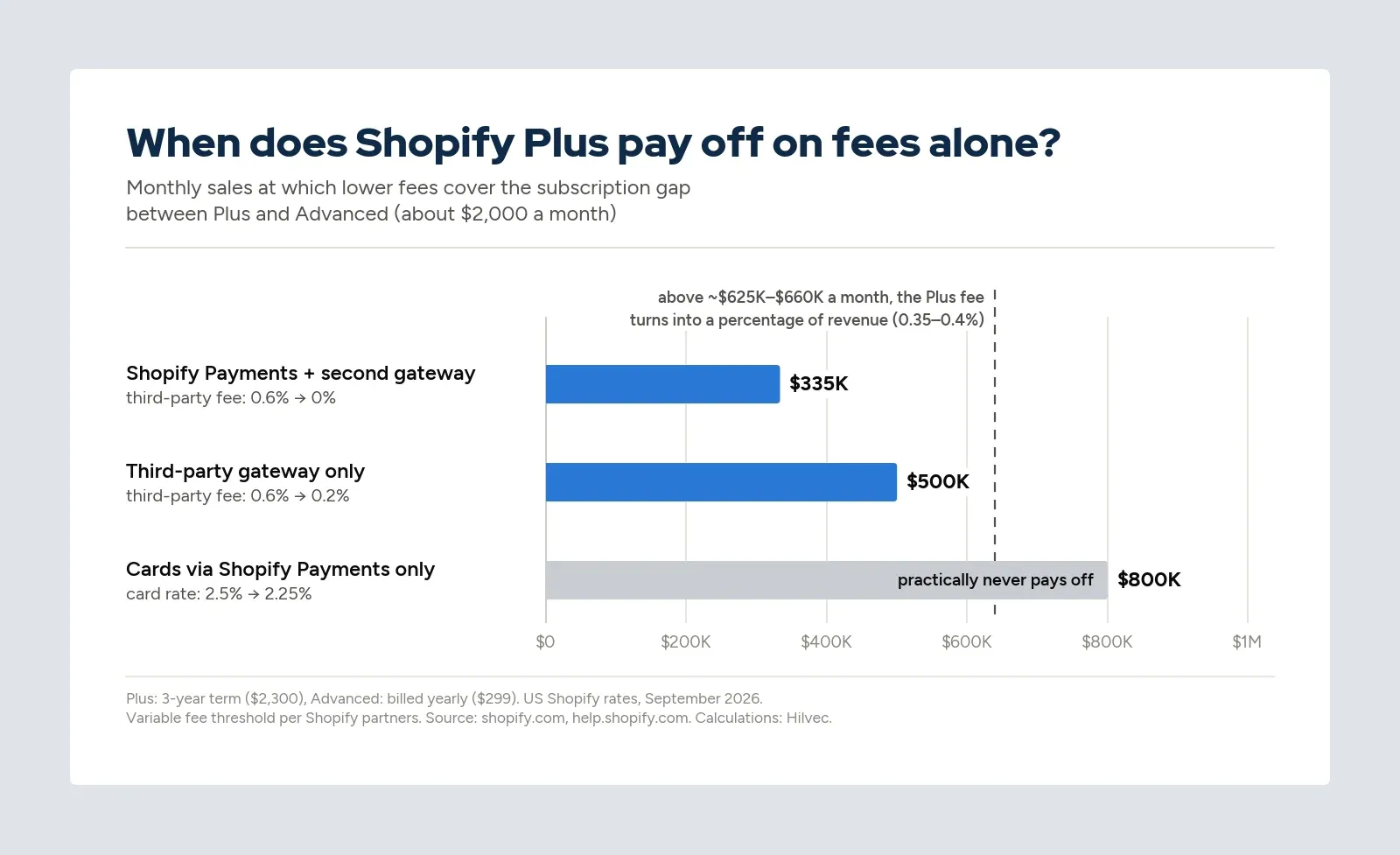
The takeaway is less obvious than it seems. Shopify Plus rarely pays for itself through fees. It pays for itself through operations. Through the hours your team stops spending on setting up promotions by hand and working around checkout limits. Through the apps you no longer need because the platform covers the same ground. And through campaigns nobody has to babysit anymore. For a plan-by-plan look at gateway costs, see our breakdown of Shopify Payments fees.
Signs you've outgrown standard Shopify
The first warning sign is rarely a technical error. It's manual work. The team starts working around the system's limits, and does it more and more often. If several of these sound familiar, the operational math probably favors Plus:
- someone creates discounts for selected customers by hand, while someone else tracks wholesale orders in a spreadsheet;
- someone has to make sure a promotion switches on and off at a specific time;
- you hear "checkout can't do that" more than once a quarter;
- you sell in several markets or combine retail with wholesale;
- every big launch, drop or influencer campaign comes with the worry that something will break;
- the apps you pay for to work around platform limits add up to close to the difference in subscription.
When Plus isn't worth it (and why that's fine)
Plus is often presented as the natural "next step", but not every growing company needs it. Not needing it right now doesn't mean falling behind on technology. More often it means the real problem is somewhere else.
- Your scale isn't stable yet. If revenue swings and the team lives in firefighting mode, Plus won't fix that. The platform organizes and automates, but it doesn't replace strategy, processes or a sales model;
- Two people run the store. Detailed roles, permissions and automation have nowhere to work when most decisions happen in the owner's head anyway;
- Checkout already does its job. With a simple sales model and a healthy conversion rate, Plus won't bring a breakthrough. A pricier plan doesn't lift conversion on its own. It only gives you the tools to optimize it deliberately;
- You don't have the people to use it. Automations need to be designed, checkout needs to be thought through, the store structure needs to be planned. Plus used at 20% of its potential is just an expensive subscription.
We'll say it plainly: it's better to move to Shopify Plus three months too late than a year too early. And if you're not sure Shopify fits your sales model in the first place, start with our take on Shopify pros and cons.
Who gets the most out of Plus today
In our conversations with clients, four types of companies come up again and again for whom Plus tends to justify itself without much calculating.
Brands with big campaigns and drops
During launches, flash sales and influencer campaigns, there's very little margin for error. Plus won't increase sales here on its own, but it helps you stay in control of what's already working. Launchpad starts and ends campaigns at set times, and checkout is built for sudden traffic spikes (Shopify cites more than 10,000 checkouts per minute).
Companies selling in several markets
Different currencies, languages, payment methods and logistics integrations quickly complicate a single store. For a first international market, a multi-language store on a standard plan is often enough. Once expansion becomes a strategy rather than an experiment, expansion stores let you tailor the offer to each market while keeping shared processes, users and standards.
B2B and hybrid businesses
When wholesale with individual price lists, payment terms and orders in the hundreds of units joins your retail business, the three-catalog limit runs out fast. Plus lets you build this properly, in one ecosystem, instead of splitting sales across several disconnected tools.
Organizations growing their teams
Marketing, customer service, fulfillment, analytics: every team needs different data and permissions. With no cap on accounts and custom role groups, technology stops being an organizational bottleneck, and the team no longer depends on the one person "who has access to everything".
Upgrading to Plus: what it looks like in practice
The good news: if you're already on Shopify, moving to Plus is a plan change, not a rebuild. Your products, customers, orders and theme stay where they are. You sign a contract with Shopify, and the new capabilities show up in the same admin.
The real work comes afterwards, and it's rarely technical. These are the three mistakes we see most often:
- No diagnosis upfront. Before you sign, write down what doesn't scale well in your store today: where the team works by hand, where errors happen, what checkout won't let you do. Companies that move to Plus with that list see a return much sooner;
- Rebuilding checkout all at once. It's tempting to add new fields, rules and promotions right away. It's better to keep what works and change things gradually, based on data. Too much logic can lower conversion instead of raising it;
- Treating Plus as an IT project. Automations, roles and cross-team processes need to be designed together with marketing, customer service and operations. Otherwise, a month later everyone is back in spreadsheets.
If you're moving to Plus from another platform, add migrating data, integrations and URLs without losing your Google rankings. We walk through that process in our guide to migrating from WooCommerce to Shopify. And if you'd rather do it with a team that does this every day, take a look at our Shopify and Shopify Plus agency page.
Shopify Plus FAQ
What's the difference between Shopify and Shopify Plus?
It's the same system and the same admin. Plus adds deeper checkout customization, unlimited staff accounts, nine extra stores, advanced B2B, Launchpad, higher API limits and priority support. In return it costs from $2,300 a month and requires a one-year or three-year contract.
How much is Shopify Plus per month?
In the US, $2,300 a month on a three-year term or $2,500 on a one-year term. At very high volume the flat fee is replaced by a percentage of revenue. On top of the subscription come processing fees, apps and development, which for most Plus stores add up to more than the plan itself.
Can you try Shopify Plus before signing a contract?
Yes. Eligible stores can take a paid Plus trial for $399 a month, lasting one to two months. It includes most Plus features, such as checkout customization, unlimited staff accounts and priority support. Just keep in mind that if you don't change anything when the trial ends, your store moves onto the full Plus plan automatically.
Will Shopify Plus improve SEO or conversion rates?
Not automatically. Your theme, site speed and content structure are the same as on the lower plans. Plus gives you tools to optimize checkout and processes, and the result depends on how you use them.
How we approach it as a technology partner
We don't start with the build. We start with a conversation and a diagnosis: where your store is losing time, money or flexibility today, and what your current setup really costs in apps, workarounds and manual work. Only then do we look at whether Shopify Plus makes sense now, later or not at all.
Sometimes the best recommendation is to stay on Advanced and prepare for the next stage deliberately. Sometimes it turns out Plus will pay off sooner than the leadership team expected. Both answers are good ones, as long as there are numbers behind them. Because instead of asking whether Plus is worth the price, it's more useful to ask whether your current technology keeps up with how fast your business is growing.
If Shopify is starting to hold you back but you're not sure Plus is the right answer, let's talk. No pressure, no sales promises, just the full picture of what the move would mean.