

You see “$39 a month” on Shopify’s website and think: fair price for a ready-made store. Six months later you open your cost summary and the numbers tell a different story. Processing fees, a handful of apps, a theme, a domain. Shopify pricing is honest, it just isn’t the whole picture. The subscription is the tip of the iceberg and usually the smallest line in a store’s budget.
So instead of asking “what does the plan cost?”, ask a better question: how much does it really cost to run a store on Shopify, and what does that depend on?
In this article we’ll cover:
- current Shopify plans and what they cost;
- how Shopify fees work and what they add up to at different revenue levels;
- what apps, themes and the build itself cost;
- the revenue at which upgrading your plan pays for itself;
- when Shopify ends up more expensive than it should be.
No technical jargon. One step at a time.
Shopify pricing plans – what each one costs
Shopify has three standard plans and Plus for larger businesses. Prices below are in US dollars as of September 2026, taken from Shopify’s official pricing page. Shopify localizes prices in many countries, so check the page for your market before you budget.
Basic, Grow, Advanced – what changes besides the price
Every plan gives you a complete store: unlimited products, hosting, an SSL certificate, checkout and access to the app store. There’s no “demo tier” where you find out a month in that the cart is missing.
The differences come down to three things:
- Payment processing fees – the higher the plan, the lower the rate (more on this in a moment, because it’s the line that matters most);
- Team – Basic is built for one person, Grow adds 5 staff accounts, Advanced 15;
- Scale and international selling – Advanced brings more detailed reporting and more options for selling across several markets.
For most stores that are just starting out, Basic is plenty. And there’s nothing embarrassing about that.
Yearly billing – when the discount makes sense
Paying for the year upfront saves you about 25%. In absolute numbers that’s $120 a year on Basic, $312 on Grow and $1,200 on Advanced.
In our view yearly billing makes sense once the store is running and you know you’re staying on the platform. If you’re still testing a business idea, stick with monthly. Flexibility is worth more than $10 a month at that stage.
Free trial and the $1 start
Shopify lets you try the platform free for 3 days, then charges $1 a month for the first 3 months. That’s enough time to set up the store, add products and see whether the admin suits you. Intro offers change fairly often, though, so check the current terms before you sign up.
Shopify fees – the cost you won’t find in the plan table
Every online sale comes with a payment processing fee. That’s true on any platform, not just Shopify. The difference is that here the rate depends on your plan and on which payment provider you use.
With Shopify Payments, the standard online card rates in the US look like this:
- Basic – 2.9% + 30¢ per transaction;
- Grow – 2.7% + 30¢;
- Advanced – 2.5% + 30¢;
- Plus – 2.25% + 30¢.
Rates differ by country, and Shopify Payments isn’t available everywhere. It currently covers around 40 countries (see Shopify’s list). That matters more than it sounds, as you’ll see below.
A third-party payment provider means paying twice
If you connect an external provider instead of Shopify Payments, you pay two fees. One to the provider, according to their pricing. And a second one to Shopify: 2% on Basic, 1% on Grow, 0.6% on Advanced and 0.2% on Plus.
This is the fee that most often catches store owners off guard. At low volume you barely notice it. At higher volume it starts to pinch. And if Shopify Payments isn’t offered in your country, you can’t avoid it, which makes the choice of plan a bigger decision.
What does that add up to?
Let’s do the math. We’re assuming an average order value of $50 and the US card rates above.
And here is Shopify’s extra fee alone when you use a third-party provider, on top of what that provider charges:
The takeaway is simple. At $50,000 in monthly revenue, processing fees are more than forty times the Basic subscription. That’s why choosing a payment provider is a financial decision, not a technical detail.
What do apps, a theme and a domain cost?
Shopify does a lot out of the box, but not everything. Some features come from the Shopify App Store. This is the second line, after fees, that tends to grow quietly.
A typical store ends up needing apps for a few things:
- shipping and returns – carrier integrations, label printing, a returns portal;
- reviews and email marketing – collecting reviews, automations, abandoned cart recovery;
- subscriptions, bundles and upsells – anything beyond a standard product page;
- multichannel selling – marketplaces, product feeds, inventory sync.
Most apps bill monthly. In our experience a sensibly configured store lands somewhere between $50 and $200 a month. You can spend more. We’ve seen stores running twenty apps, half of which did the same thing while the other half slowed the site down.
A theme is a one-time cost. The Shopify Theme Store has free themes built by Shopify (and they’re good, with Dawn and Horizon leading the pack) as well as paid ones, usually from around $100 to over $400. A domain adds roughly $15–$20 a year, depending on the extension and the registrar.
The cost of the build – template, customization or custom design
You can launch a Shopify store yourself over a weekend. You can also hand it to an agency and wrap up the project three months later. Both approaches are fine, they just answer different needs.
In practice we see three scenarios:
- A ready-made theme, set up on your own. The cost is mostly your time. A good way to test an idea and get your first orders. If that’s your route, our guide on how to create a Shopify store in 5 steps will help.
- A theme tailored by specialists. A paid theme, adjustments for your brand, payments, shipping and analytics configured properly. Simple builds of this kind start in the low thousands of dollars.
- Custom UX/UI design with integrations. Your own theme, workshops, a connection to an ERP or warehouse system, data migration from your old platform. The budget here is clearly higher and always quoted individually.
What drives the quote? The same factors as with any website: scope, number of templates, integrations and the amount of content. We’ve broken that down in our article on what affects the cost of a website. And if you’d like to see how that process works with us, take a look at our Shopify agency page.
When should you upgrade? A simple break-even calculation
This question comes up in almost every client conversation. And you can answer it with a calculator.
A higher plan costs more in subscription but lowers your fees. So you only need to check at what revenue the savings on fees cover the difference in plan price. We’re using monthly billing here.
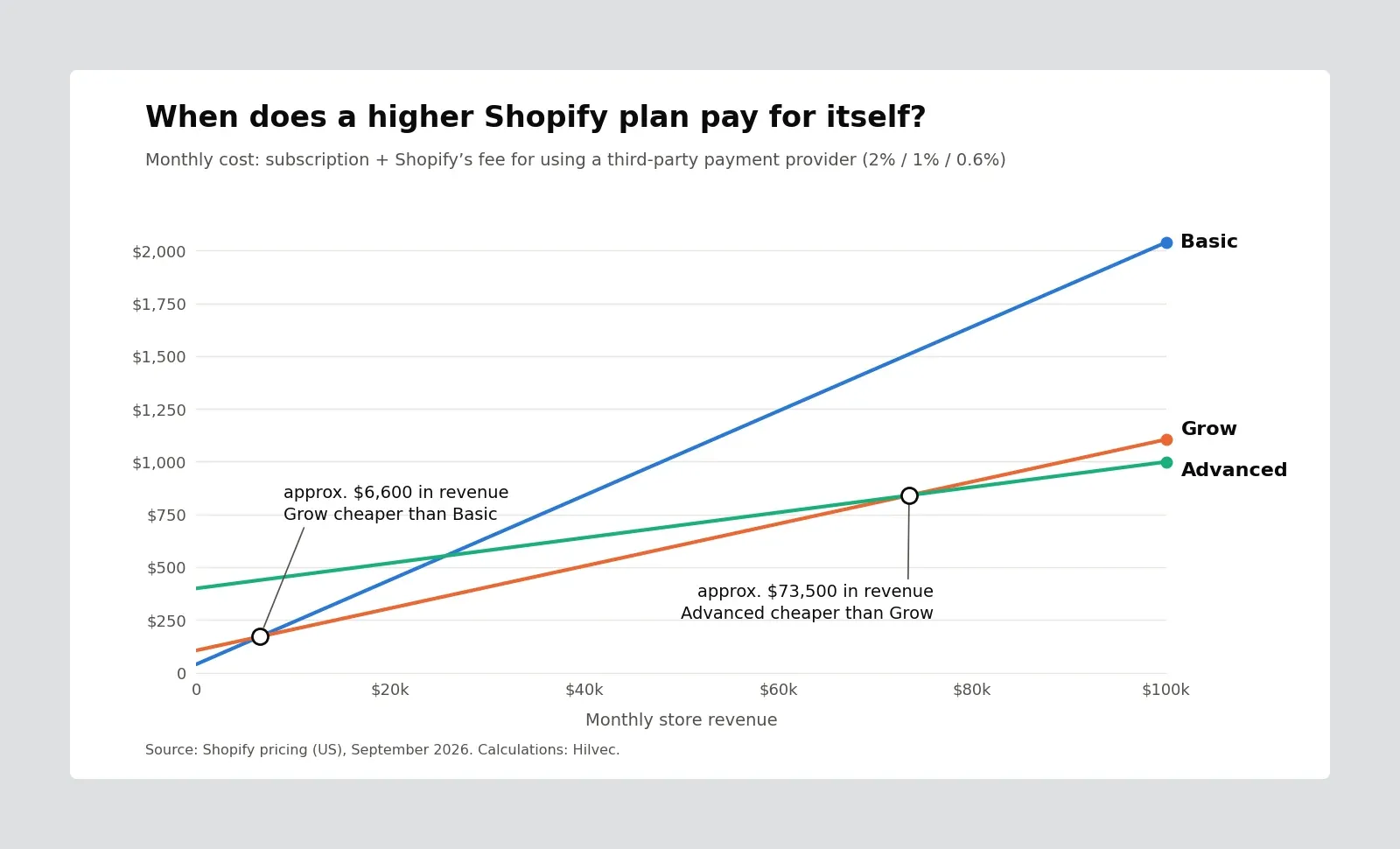
See the gap? If you use a third-party provider, Grow pays for itself at around $6,600 in monthly revenue. With Shopify Payments, the fee math alone justifies the switch only at about $33,000.
Fees aren’t everything, of course. Sometimes you move to Grow earlier because two customer service people join the store and need their own accounts. That’s a good reason too. What matters is that the upgrade follows from the math or a real need, not from the belief that “a serious store should be on a higher plan”.
Shopify Plus pricing – what it costs and who it’s for
Shopify Plus starts at $2,300 a month. There’s no yearly discount option, and at very high volumes the terms are negotiated individually.
For that you get the lowest fees, unlimited staff accounts, extended checkout customization, automations and B2B tools. It’s a plan for companies that standard Shopify has started to constrain operationally, not for stores that simply sell well.
The topic is broad enough that we gave it its own article: Shopify Plus – when it makes sense and when it doesn’t.
When Shopify costs more than it should (and what to do about it)
Shopify isn’t the cheapest platform on the market and doesn’t try to be. You’re paying for a store that simply works, with updates, security and servers being someone else’s problem. Still, there are situations where the math stops adding up.
- Very thin margins. If you make a few percent on each product, every half a percentage point in fees matters. Run the numbers before launch, not after.
- An app for everything. Ten subscriptions at $15 each is $150 a month. It’s often cheaper, and healthier for site speed, to build a feature once, directly into the theme.
- An unusual sales model. Complex configurators, non-standard billing or elaborate B2B logic need workarounds on the lower plans. And workarounds cost money.
- A third-party provider for no reason. Unless you’ve negotiated exceptionally good rates with your provider, paying Shopify an extra 2% on Basic rarely makes sense.
What then? Sometimes tidying up your apps and switching payment providers is enough. Sometimes a different type of platform is the better choice, which we cover in our comparison of types of online stores. For the full picture of strengths and weaknesses, see Shopify pros and cons.
Shopify pricing in practice – how we approach it as a technology partner
Let’s pull it into one budget. Below are two simplified scenarios of yearly running costs, excluding the build and marketing.
In both cases the subscription is less than 10% of the total. So if you want to plan your Shopify costs wisely, look at fees and apps first, and pick the plan last. For a store that’s just starting, that will almost always be Basic with Shopify Payments. For a team and revenue in the tens of thousands a month, Grow. Advanced and Plus are decisions worth backing with a calculation, not ambition.
When someone comes to us with a question about a store, we don’t start with the build. We start with a conversation and with working out what actually pays off: which plan, which payment provider, which features through an app and which are better built once. Sometimes that turns into a project. Sometimes into a recommendation to stay on a ready-made theme for now and come back to the topic in a year. Both answers are good ones, as long as there are numbers behind them.
If you’d like to go through that math for your own store, let’s talk. No pressure, and with the full picture of the costs.
Related articles