Your website looks good, campaigns bring in traffic, and yet inquiries and orders lag behind. Somewhere along the way, visitors give up. But where? As competition grows, more companies look for the answer in the usability of their website or online store. That's where a UX audit comes in: a structured way to find the places where your site is losing customers before you spend another dollar on ads.
The most common fear about a UX audit goes like this: “we'll get a thick report telling us to rebuild the whole site.” A good audit does the opposite. It shows which few changes will make the biggest difference, and which issues can safely wait.
Sometimes it ends with a redesign. More often, it ends with a list of specific fixes the team ships within a few weeks. In this article we also show a real audit: the Nizio furniture store, the numbers from its heatmaps and what changed on the site afterwards.
What a UX audit is and what it isn't
Every business has goals. Sometimes it's getting as many inquiries as possible through a contact form, sometimes it's hitting sales targets in an online store. But there are times when something holds growth back and the goals keep slipping. That's a signal to take a closer look at how the website is built and how it works.
That's exactly what a UX audit does. A usability audit reviews a website against its business goals: it examines each element, draws conclusions and recommends changes. Putting those recommendations into practice should lead to better results, meaning more inquiries, orders or sign-ups.
A UX audit is often confused with other services that also end with a report. The differences matter, because they decide which question you get an answer to.
In practice, the lines blur. A good UX audit draws on analytics, and its findings often lead to testing. We cover research with users in more detail in User experience research – what it is and when to do it.
Signs your website needs a UX audit
Nobody wakes up thinking “we need a UX audit.” It usually starts with a number that won't budge, or with the same customer questions coming back again and again. The most common signs are:
- lots of visits, few conversions, even though the traffic matches what you offer;
- a clear drop-off at one step: in a form, in the cart, at shipping selection;
- repeat questions to customer support, like “where do I find…” or “how do I change…”;
- mobile converts noticeably worse than desktop;
- a site that has grown for years, where nobody remembers why the menu looks the way it does.
The scale of the problem is often bigger than it seems. Baymard Institute, which has studied online stores for years, puts the average cart abandonment rate at about 70%. Some of those shoppers are just browsing, but many leave for reasons an audit catches easily: being forced to create an account (18% of shoppers surveyed), a checkout that's too long or complicated (17%), or not seeing the full order cost up front (12%).
According to Baymard Institute, better checkout usability could lift conversion rates for large online stores by as much as 35%. That's the researchers' estimate, not a guarantee, but it shows how much a poorly designed checkout can cost.
What a UX audit includes
The scope of a UX audit depends on the company's needs and on what's supposed to happen once it's done. Most audits come down to three parts:
- a report with recommendations, walked through in detail with the people who will make the changes;
- wireframes and visual designs showing the recommended changes;
- implementation, meaning a developer puts the recommendations into practice.
You don't always need all three. Companies that already have some of the skills in-house often outsource only part of the work. A typical example: a company has developers who can make the changes, but no designers or UX specialists.
The report is the heart of the audit. It usually covers:
- user behavior based on analytics tools (for example Google Analytics 4, heatmaps or session recordings);
- a profile of your potential customer and their path through the site, in other words the persona you're building the product or service for;
- recommended changes to content, product presentation, navigation and page layout, with the reasoning behind them;
- notes on performance and how the site works on mobile devices;
- accessibility, meaning whether people with disabilities can use the site.
That last point is no longer a nice-to-have. Since June 28, 2025, the European Accessibility Act applies to e-commerce services offered to customers in the EU, with WCAG as the practical benchmark. In the US, thousands of website accessibility lawsuits are filed under the ADA every year. Either way, a UX audit is a good moment to check accessibility as well.
What a single report entry looks like
Every issue in the report is grouped by its impact on business goals, usually as critical, medium or minor. For each one, a good report adds three things: where the problem occurs, why it gets in the way and what exactly to change. Without that last part, the report quickly ends up in a drawer.
Here is one entry from our audit of Nizio, a maker of solid-wood loft beds. The data comes from click maps and session recordings in Microsoft Clarity.
Two things set an entry like this apart from a list of remarks. First, every observation comes with a number or a recording you can go back to. Second, the recommendation is specific enough for a developer to estimate without asking follow-up questions.
How priorities are set
A report without priorities is a wish list. At Hilvec we use the MoSCoW method: every recommendation lands in one of four groups. Must means changes without which the site is losing customers right now. Should covers things that matter but aren't critical. Could is for improvements worth doing when there's budget left. Won't is for ideas deliberately parked so they don't distract the team. The order is decided not by how many problems there are, but by their impact on the business goal weighed against the cost of fixing them.
This is what the final priority table for the Nizio store looked like:
Seven items, three of which need doing right away. That's what the end of an audit should look like: the team knows where to start on Monday.
UX audit methods and tools
An audit combines two perspectives. The first is expert judgment: someone who has been through hundreds of sites checks yours against established rules. The second is data: numbers and recordings showing what users actually do, rather than what they're supposed to do according to the designer. Either one alone gives you half the picture.
Heuristic evaluation, or Nielsen's ten rules in practice
The most common expert method is a heuristic evaluation based on the ten principles Jakob Nielsen formulated in the 1990s. They sound academic, but each one describes a very concrete mistake you can find on a company website or in a store.
A good complement is a cognitive walkthrough, which means going through the site as a specific person with a specific task: “I'm a parent looking for a bunk bed for two kids in a small room.” A walkthrough catches gaps a checklist won't, because they're about the order of information rather than individual elements.
Data: what users actually do
Expert review tells you what should work. Data tells you what does. In an audit we use four kinds of tools, each answering a different question.
Google Analytics 4 and Google Search Console show where users come from, which pages they view and at which step of the funnel they drop off. That's the first place we look for anomalies, such as a category with lots of traffic and zero sales.
Heatmaps and session recordings, in Microsoft Clarity (free) or Hotjar, show where people click, how far they scroll and where they stop. Three metrics are especially useful. Scroll depth tells you what share of users ever saw the button or the offer. Dead clicks are clicks on elements that don't respond. Rage clicks are fast, repeated clicks in one spot. In the Nizio store, the click map on the homepage showed a burst of rage clicks on the left arrow of the customer reviews carousel. The arrow was inactive. No expert with a checklist would have spotted that, because on the surface everything looked fine.
PageSpeed Insights and Lighthouse measure loading speed and stability. A slow site breaks usability before the user clicks anything, and on a phone with a weak signal the difference between three and six seconds is the difference between a purchase and an exit.
WAVE and axe DevTools check accessibility: contrast, image descriptions, keyboard operation, form correctness. These are automated tools, so they catch roughly a third of the issues. The rest has to be checked by hand, for instance by going through a form without a mouse.
One caveat: a tool doesn't replace judgment. Clarity will show you that 14% of users click the discount code field. Only an expert can tell you whether that's good or bad, and what to do about it.
How a UX audit works, step by step
Commissioning a UX audit, or running one with your own team, is easier when you understand the whole process. Skipping a step usually means you won't see results once the project is over.
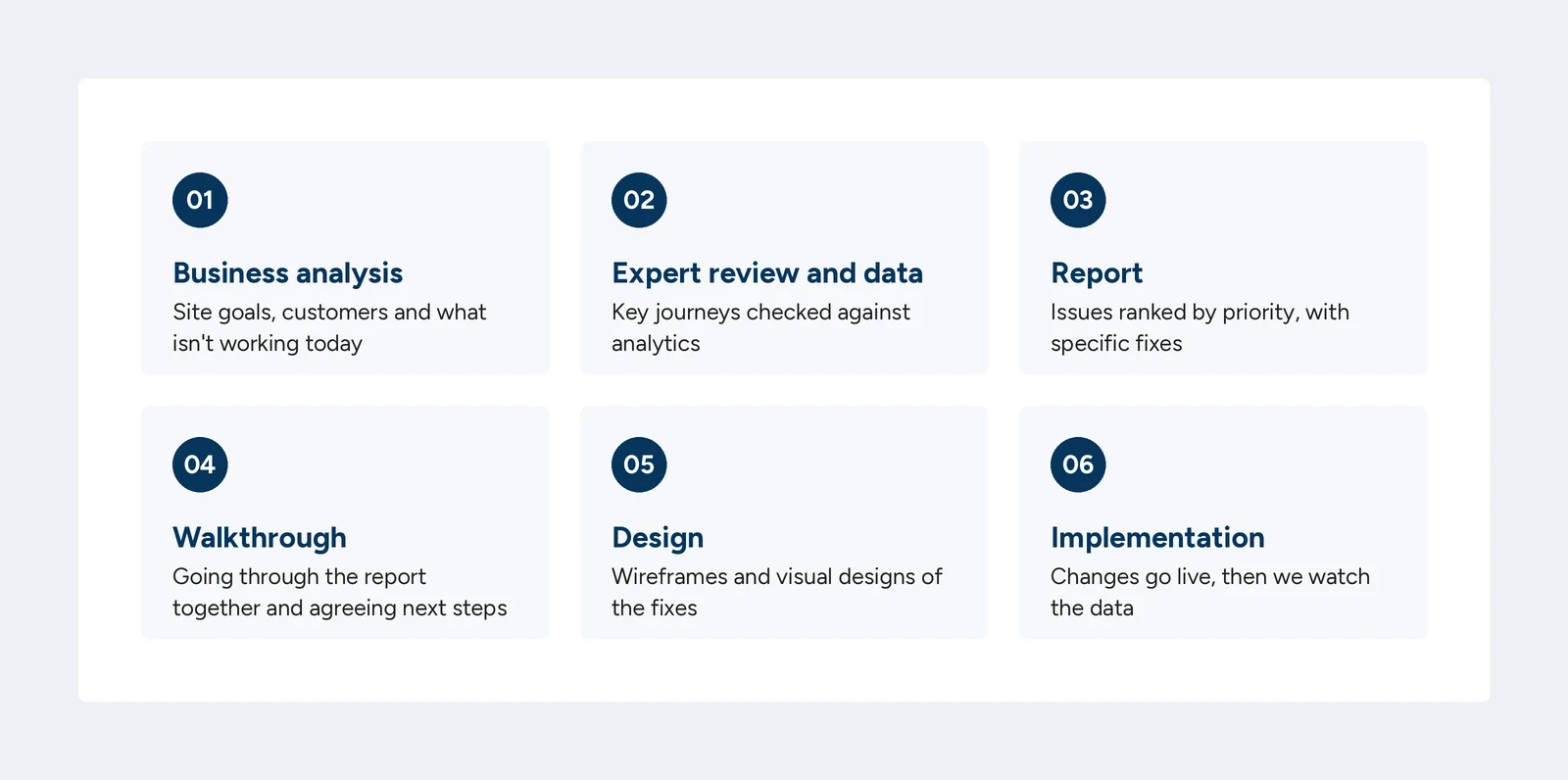
- Business analysis. A conversation with your team: what the site is for, who the customers are, what isn't working today. Without it, the audit judges the site “in general” rather than against your business.
- Expert review and data. The core of the audit. Specialists go through the key journeys (a heuristic evaluation or a cognitive walkthrough) and compare what they see with analytics data. If user research is in scope, this is when it happens.
- Report. All findings in one document, with priorities and examples.
- Walkthrough. A meeting where we go through the report point by point, so both sides understand the issues the same way and agree on next steps.
- Design. If the recommendations fit the budget, we prepare wireframes and visual designs. UX and UI designers work together so the solutions match what customers need.
- Implementation. Once the designs are approved, the changes go live. After that, it's worth watching the data for a few weeks to check whether the fixes worked.
One note on step two: in an expert review, the number of reviewers matters. Research by Nielsen Norman Group found that a single evaluator finds only about 35% of usability problems on average. That's why they recommend several evaluators, ideally five and at least three. It's worth asking your provider how many people will work on your audit.
How long does it take? An audit of a company website with one main journey usually wraps up in two to three weeks. A store with a few thousand products and a full checkout needs three to five weeks, of which a week goes on collecting data alone, because the heatmaps need something to show.
What UX audits find most often
Every website is different, but certain kinds of problems show up surprisingly often. If you have a few minutes, check for them yourself before you hire anyone.
- Forms – too many fields, unclear error messages, questions about data nobody actually needs;
- Navigation and labels – menus named in company language rather than customer language (“Solutions”, “Areas”), with the actual offer buried three clicks from the homepage;
- Checkout – shipping costs revealed only at the last step, forced account creation, missing payment methods customers expect (we break down the real cost of payment options in Shopify Payments fees);
- Mobile – buttons too small to tap, pop-ups covering content, tables you can't scroll;
- Trust – no company details, reviews or return information where customers make their decision.
The good news: most of these problems can be fixed without rebuilding the whole site.
Auditing a store vs. auditing a service website
The list above is shared, but the weight of the audit falls differently. In an online store, four places matter most: the product page, the listing with filters, the cart and the checkout. A store audit is largely an audit of the purchase path on a phone, because that's where most of the traffic is and where conversion is usually worst. The questions are: does the customer see the price, availability and shipping cost before adding to the cart, do the filters match how people actually choose (color, size, price), and how many times do they have to scroll to reach the button along the way.
On a service or B2B website, the conversion is an inquiry, a call or a booked meeting, and the path is shorter. Here the audit focuses on whether it's clear within five seconds what the company does and for whom, whether the offer is described in the language of the customer's problem, whether the form asks only for what's necessary, and whether the proof (case studies, reviews, client names) sits where the decision is made. The most common mistake on B2B sites is a sprawling “about us” section next to an offer the reader has to piece together themselves.
A UX audit in practice: the Nizio store
Nizio is a family-run company from south-eastern Poland that makes solid-wood loft beds and bunk beds. We designed their online store, and after a few years of operation we ran a UX audit to see how it was coping with real traffic. The audit was built on Microsoft Clarity data: heatmaps and click maps for fourteen page views on desktop and mobile, plus session recordings, all set against an expert review.
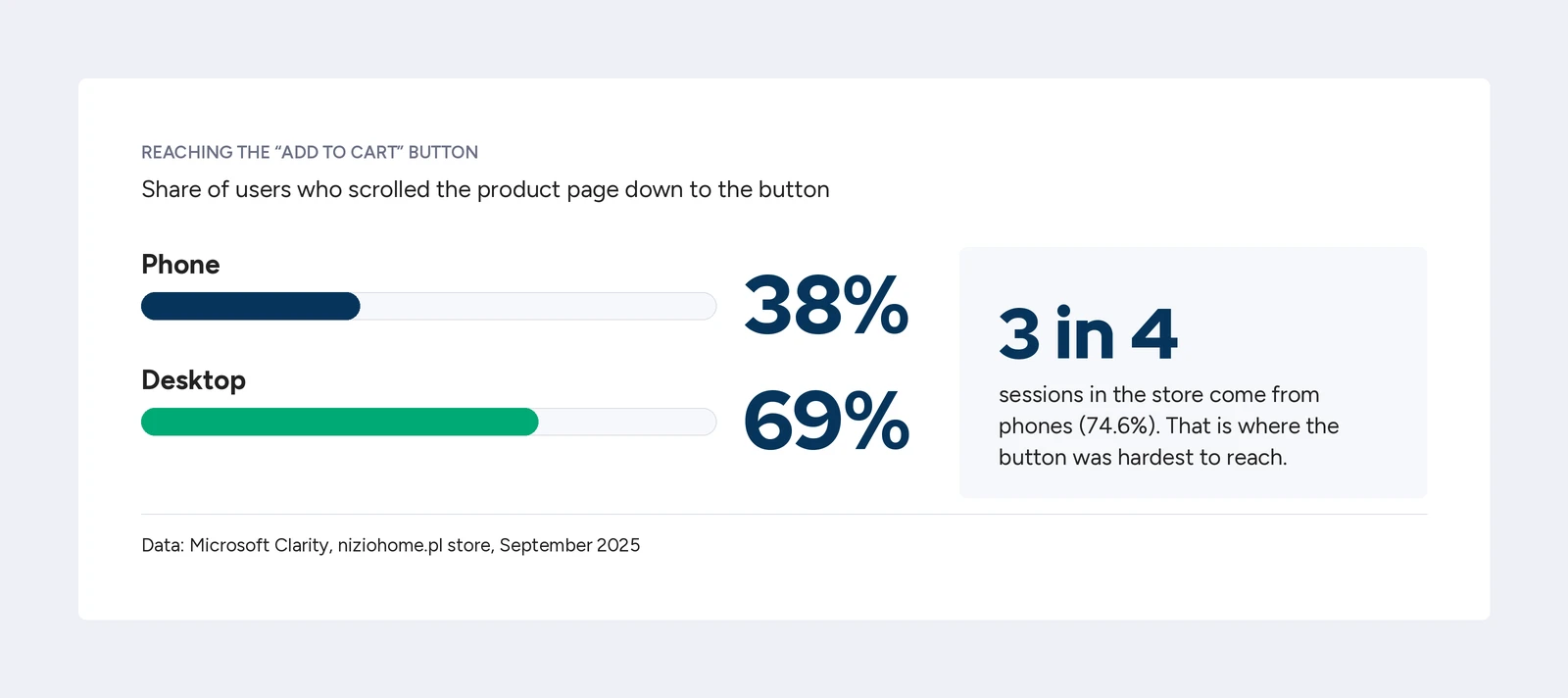
The first finding concerned the product page. On phones, only 38% of users scrolled down to the “Add to cart” button; on desktop, 69%. Recordings showed people scrolling up and down looking for it. At the same time, the most-clicked element on the page wasn't the product photo but the technical drawing with dimensions: 3.86% of clicks, more than all the photo thumbnails combined. A customer buying a loft bed wants to know first whether it will fit under the ceiling. The dimensions were there, but tucked away lower down. The recommendation: move the button up, add a sticky bar with the chosen variant, price and button, and bring the dimensions forward. Three quarters of the store's sessions came from phones, so that's where the problem hurt most.
The second finding came from a single recording. A shopper added a bed in oak to the cart, then the same bed in white, and then searched the store by hand for a safety rail. The store wasn't suggesting related products, so the customer had to assemble the set on their own. One recording, and it was immediately clear that a section with accessories matched to the chosen color was missing.
The third finding was the discount code field in the cart described above, which collected 14.65% of clicks and sent some customers off to hunt for a discount outside the store.
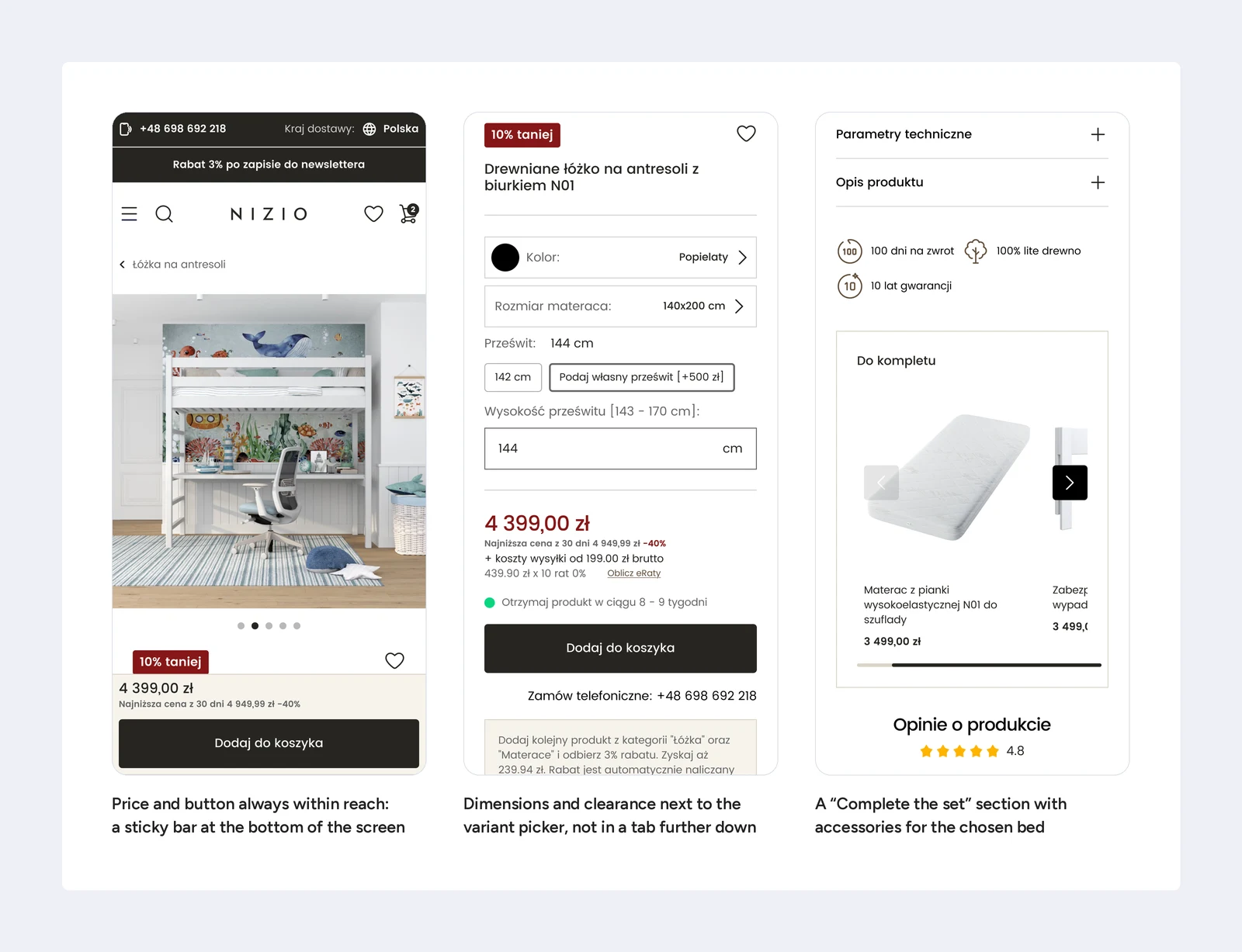
What made it onto the site? The product page now has a sticky bar with the variant, price and button, a “Complete the set” section with accessories, and close-ups showing the joints and the wood finish. The newsletter sign-up with a 5% discount code sits in the top bar and at the bottom of the product page, not in the middle of the checkout. None of these changes required rebuilding the store. All of them came from numbers that nobody had noticed before the audit.
Check your website in 15 minutes
Before you hire anyone for an audit, run a quick test on your own site. Ideally on your phone, and ideally with someone who hasn't seen the site before. Answer each question with a simple yes or no:
- Within five seconds of landing on the homepage, is it clear what you offer and who it's for?
- Can you reach your most important service or product in two clicks or fewer?
- Does your contact form ask only for what you actually need to reply?
- Do customers see the full order cost, shipping included, before they reach payment?
- Can people place an order without creating an account?
- Are buttons and links easy to tap with a thumb?
- Do error messages say what to fix, not just that something went wrong?
- Are reviews, company details and return policies visible where people make their decision?
One or two “no” answers usually mean quick fixes you can make without an audit. Three or more suggest your site is losing customers in several places at once, and it's worth taking a closer look. This test won't replace a proper look at your data, but it shows you where to start.
A do-it-yourself UX audit, step by step
If the test went badly and there's no budget for an external audit yet, run your own. It takes a day or two and gives you a list you can actually work with. Start with the data: in Google Analytics 4, find the three pages with the most traffic and check what users do next on each of them. If you run a store, open the purchase funnel report and note the step where most people drop off. Install Microsoft Clarity if you haven't already, and give it a week to collect recordings.
Then go through the site as a customer, on a phone, with one specific task, such as “buy the thing we sell most” or “send an inquiry about our most expensive service.” Note every moment you have to stop and think. On the homepage, check whether the first screen answers the question of what this company is, and whether there's one clear action on it. In the navigation, count the clicks to your most important offer and read the menu labels out loud: if they sound like the company's internal vocabulary, change them. On a product or service page, see whether price, availability, shipping cost or delivery time are visible without scrolling, and whether dimensions, specifications or the scope of the service sit above the marketing copy. In the form and the cart, mentally remove every field the order could be completed without, and check that the next-step button is visible at every step. Finally, unplug the mouse and try to get through the same process with the keyboard; it's the simplest accessibility test there is.
From the Clarity recordings, watch ten mobile sessions that ended without a conversion. A pattern usually shows up by the fifth one. Sort everything you've noted into three groups: do this week, plan, park. That's already a report, just without the cover page.
How much does a UX audit cost?
The cost of a UX audit varies a lot. Sometimes it includes user research, which is a significant budget item on its own. Other times, an expert review backed by analytics data is enough. The price mostly depends on:
- the size of the site and the number of journeys to review, because a company site with a contact form is a different job than a store with thousands of products;
- the methods, meaning an expert review only or user testing on top of it;
- the deliverables: a report alone, a report with wireframes or full implementation;
- access to data, because if analytics isn't set up correctly, it has to be fixed first.
The range on the market is wide. A quick heuristic review of a single site by a freelancer starts at a few hundred dollars. An agency audit with data analysis, recordings and a walkthrough usually runs from about $1,500 to $4,000. Audits that include user research, wireframes and implementation go well into five figures.
At Hilvec, an audit like the one we ran for Nizio, meaning an expert review, heatmaps and recordings, a report with MoSCoW priorities and a walkthrough, costs around $2,800 (about €2,400) excluding VAT. Smaller company websites with a single journey are quoted individually. We're based in Poland, which is why the price is lower than what a US agency would typically charge for the same scope, without the scope being any smaller. For perspective: in a store selling $30,000 a month, lifting conversion by a tenth of a percentage point pays for such an audit within a few months.
What happens after the audit
The report is half the journey. The other half is implementation and checking whether the changes worked. That's why, during the walkthrough, we agree right away who implements which items and in what order, usually starting with the must group, which fits into one or two sprints.
We measure the effect with the same metrics that revealed the problem. If the audit showed that 38% of mobile users reach the button, after the sticky bar goes live we check how many reach it now. If the drop-off was in the cart, we look at cart abandonment and cart-to-order conversion, separately for phones. On a service website, we count form inquiries and calls against traffic. It's worth collecting data for four to six weeks after a change, to even out seasonal swings and campaigns.
An audit isn't a one-off. We repeat it after a major change to the site, after a change to the offer, or when the numbers start sliding for no obvious reason. In calm conditions, a review once every twelve to eighteen months is enough, ideally on the same data so the results can be compared.
When a UX audit doesn't make sense
A UX audit is a good tool, but not for every situation. Sometimes your budget is better spent elsewhere:
- the site is new and there's no data yet – wait a few months or run a quick usability test instead;
- the problem is traffic, not conversion – if only a handful of people visit the site, start with SEO and campaigns;
- you're planning a rebuild within six months anyway – then make the audit the first stage of the new project, as we describe in our piece on website redesign;
- nobody will implement the recommendations – a report without implementation changes nothing, and a year later it's out of date.
How to choose a UX audit provider
There are plenty of audit offers out there, and the differences only become visible once the report arrives. A few questions asked before signing help you filter them earlier.
Ask what data the provider will work with and whether they need access to your analytics. An audit “from the outside”, without data, is just an opinion. Ask how many people will review the site; the answer “one” means you'll get roughly a third of the problems. Ask for a sample report entry from another client, even an anonymized one. If it contains only a description of the problem with no recommendation and no priority, the report will end up in a drawer. Check whether a walkthrough is included: a report emailed over without a meeting is half a service.
There are warning signs too. A “free” audit bundled with a redesign proposal usually concludes that you need a redesign. A promise of a specific conversion lift before anyone has seen your data is marketing, not analysis. And a hundred-page report without priorities sounds impressive only until someone has to do something with it.
UX audits at Hilvec: a report you can act on by Monday
Even the best marketing can't make up for a website that's hard to use. People leave when anything is unclear, when services are vaguely described or when a form is too long. They don't finish buying because the path to checkout is too long and the payment options too limited. Every one of those visitors is a sale that could have happened.
.svg)
That's why we don't start with the report. We start with a conversation about your goals and with the data, then walk through the site the way your customers do. At the end, you get a list of changes ranked by how much they can deliver and how much they cost. Sometimes the recommendation is short: five fixes to ship in a few weeks. Sometimes the audit shows the site is ready for a new UX/UI design. Both answers are good, as long as they're backed by data.
If you're wondering where your website or store is losing customers, take a look at how we work as a UX/UI agency and let's talk. No pressure, just clear findings.
Frequently asked questions about UX audits
What's the difference between a UX audit and an SEO audit?
An SEO audit checks whether Google can find and understand the site, so it's about traffic. A UX audit checks what happens to a user who has already landed on the site, so it's about conversion. If you have little traffic, start with SEO. If you have plenty of traffic but few inquiries or orders, you need a UX audit.
How long does a UX audit take?
Two to five weeks, depending on the size of the site. A company website with a single journey usually takes two to three weeks. A store with a full checkout needs three to five, because the first week goes on collecting heatmap and recording data.
Does a UX audit require access to my analytics?
Yes, and it's worth granting it. Without data from Google Analytics and a recording tool, the audit rests on expert opinion alone, which is half the picture. Read-only access is enough; the provider doesn't need permission to change anything.
Can I do a UX audit myself?
Yes, at a basic level. The test described above and a day's work with Google Analytics and Microsoft Clarity will surface the most obvious problems. An external audit adds an outside perspective, several pairs of eyes and experience from other sites, which is usually what's missing in-house.
How often should a UX audit be repeated?
After every major change to the site, after a change to the offer, or when results start dropping for no clear reason. Without such signals, a review once every twelve to eighteen months is enough.
Does a UX audit cover accessibility?
It should. Since June 28, 2025, the European Accessibility Act applies to online stores selling to EU customers, and in the US website accessibility is a steady source of ADA lawsuits. A good audit checks at least contrast, image descriptions, keyboard operation and the readability of forms.
Will I have to rebuild my website after the audit?
Usually not. Most audit recommendations are changes to existing templates: moving a button, shortening a form, adding a section with accessories. A redesign comes out of an audit only when the problems concern the structure of the whole site rather than individual elements.
Related articles