UX/UI design for websites, online stores and apps

A good-looking website that visitors leave without contacting you is an expensive poster. We design websites, online stores and apps so that users understand your offer at once and reach the goal without friction: an inquiry, a purchase or a sign-up. Every UI/UX design project at Hilvec starts from data and business goals, and the visuals follow.
UI/UX design services at Hilvec
We design UX and UI for company websites, online stores and web apps such as customer portals and order management systems. First we work out what users need to do on the site and what gets in their way today, and only then choose the colors, typography and details that match your brand. If your site is already live, we usually start with a UX audit, so the changes we design are based on data from your store.
Most of the money usually leaks out in the cart and in forms. According to Baymard Institute, about 70% of online shopping carts are abandoned on average, and forced account creation and overly long checkouts are among the most common reasons. These are design mistakes that can be fixed without rebuilding the whole store.
You can build the design with your own developers or with us: we build websites in Webflow and online stores on Shopify. If you are looking for a team for the long run, for example on a monthly design plan, visit our UI/UX agency page.

What a well-designed UX interface changes
A store that's easier to buy from
In an online store, we focus on the places where the buying decision is made: search and filters, the product page, the cart and checkout. Customers should be able to compare products quickly, see the shipping cost before the cart and place an order without creating an account. Changes like these often bring more orders than a new ad campaign, because they work on the traffic the store already has.
A company website that brings in inquiries
On a service website, visitors look for three things: whether you understand their problem, whether you have proof, and how to get in touch. We arrange the offer, case studies and reviews so the answer to each question is close at hand, and the form is short and visible at the right moment.
An app that explains itself
In customer portals and web apps, every unclear screen becomes another ticket for your support team. We design them so users can complete their most frequent tasks without instructions, while less common features stay out of the way of daily work.
A design that's ready to build
You get a design your developers can build without guesswork, with a component library and notes on how each element behaves. On request, we also check it against the WCAG accessibility guidelines. Since June 28, 2025, the European Accessibility Act has applied to most online stores selling to consumers in the EU, with an exemption for microenterprises.

Selected UI/UX design projects

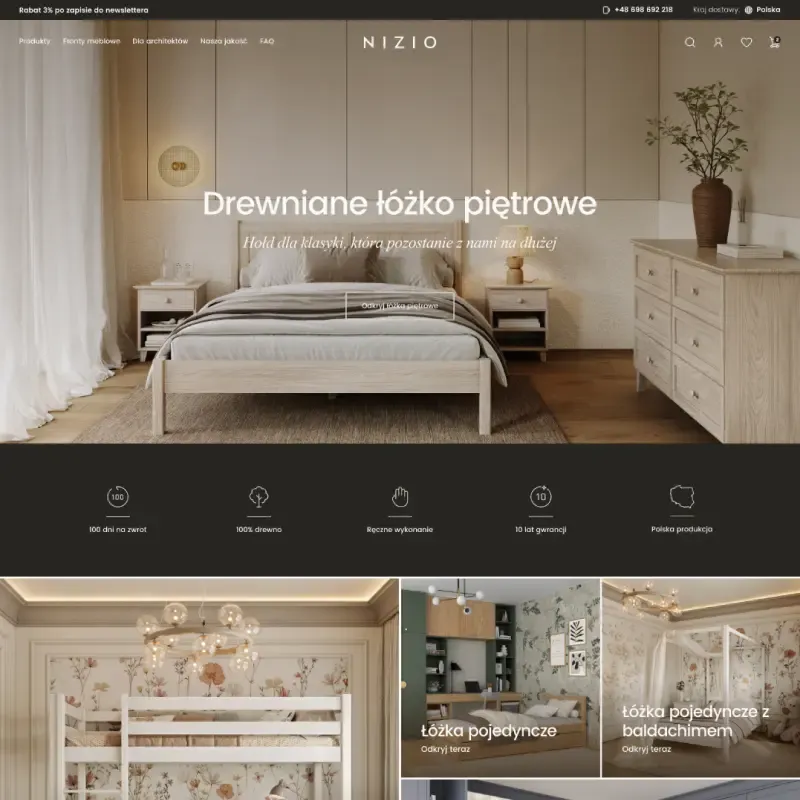

UX/UI design of an online store for Nizio, a solid wood furniture maker
For Nizio, a family-run company from Biłgoraj, Poland, that makes solid wood beds and furniture, we designed a new online store: from analysing customer behaviour, through UX wireframes, to a complete UI design for desktop and mobile.

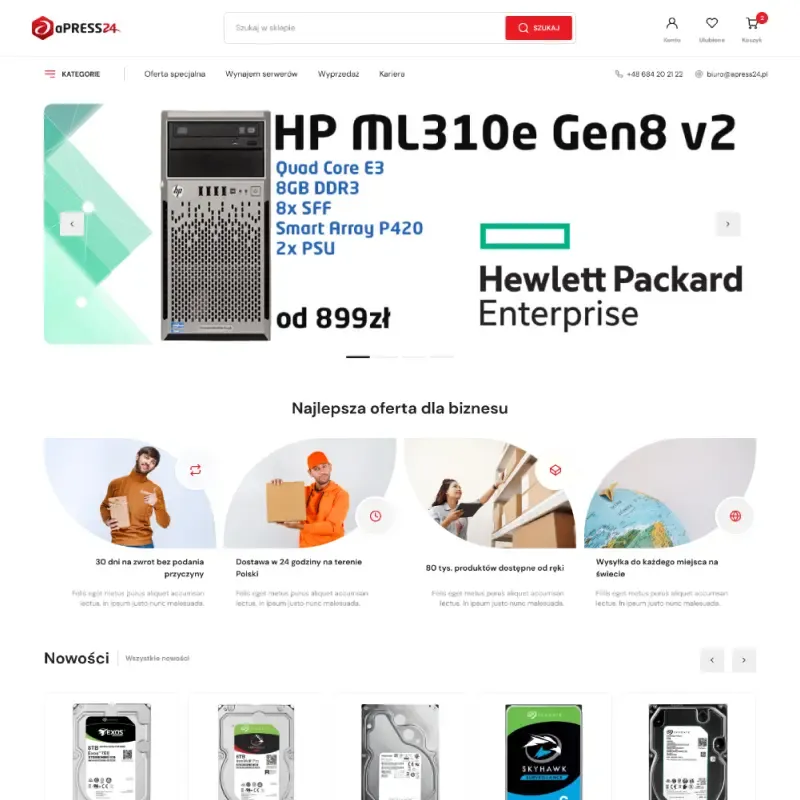

UX/UI design for aPress24.pl, an online store for server and gaming hardware
For Apress24.pl, an online store specializing in the sale of server equipment and gaming components, we designed a complete user interface, including all the key screens of the purchasing process, customer panel and product sections.


Process



UX audit or a redesign from scratch?
Choose a UX audit when your store or website is live and has traffic, but too few people buy or send an inquiry. A design from scratch makes sense when you are changing platforms or your sales model, or when the audit uncovers so many fixes that redesigning the whole thing is cheaper.
Signs that an audit is enough
Most companies that come to us have growing traffic and flat sales. Many people add products to the cart but don't finish the order, or visitors move from the offer to the contact page and back without sending the form. Another sign is the same questions coming into your support team again and again: about shipping costs, size availability or order status. If customers have to ask, the site isn't answering them in the right place. In these cases the problem usually sits in a few specific views, and the audit shows where to start.
That was the case with the Nizio store: of the seven issues the audit found, three needed fixing right away.
When a new design pays off
A new design makes sense when you change your store platform, move from retail to wholesale or the other way round, or when the site has grown a patchwork of add-on sections over the years and every change breaks something. At that point, fixing individual views costs more than putting the whole thing in order. A design from scratch takes longer, but it tidies up the entire interface at once and gives you a component library that makes new pages easy to build.
What to do with the audit results
After the audit, you can roll the changes out in stages with your own team or have us design the fixes and review them after they go live. Some companies make a few of the simplest changes first, measure the effect in Google Analytics and only then decide on a bigger project.
For large stores, we often combine both approaches: we start with an audit, and its findings become the brief for the new design.
A design that fits your store platform
We have designed stores on Selly, PrestaShop, Shopify and SOTESHOP, and on each of them some views can be changed in the theme editor while others need a developer or an app; where exactly that line runs depends on the theme and the plan. So before we draw the first screen, we check in your store what can be changed and what is shared by every store on the platform, and for anything unclear we ask the platform's support or your developer. We design what can actually be built, so the project never ends up in a drawer because of one screen that cannot be rebuilt.
Tools we use for UX and UI design
We design in Figma, run workshops and sitemaps in Miro, and create illustrations and animations in Illustrator, Spline and Lottie. We track user behavior in Google Analytics, Search Console, Microsoft Clarity and Hotjar.




Questions and answers
How much does UI/UX design for a website or store cost?
UI/UX design at Hilvec starts at $7,500. The price depends on the number of views, such as the home page, category, product page, cart or customer account, and on whether we design from scratch or improve an existing store after a UX audit. We price each view separately, so you know exactly what you are paying for.
How long does a UI/UX design project take?
A UI/UX design project usually takes one to two months. The first week covers a workshop and a plan of views. Next come wireframes and a clickable prototype, and finally the visual design of every screen for desktop and mobile. Projects with a customer account or a complex checkout take longer.
What do I get at the end of the project?
You get a Figma file with wireframes, a clickable prototype and the visual design of all agreed views. It includes a component library, such as buttons, forms and product cards, and notes for your developers on how each element behaves. The file is yours, so you can hand it to any development team.
How much does a UX audit cost and what does it include?
A UX audit starts at $7,500 and takes about a month. We analyze Google Analytics data and session recordings, and walk through key paths such as product search, cart and forms using Nielsen's heuristics. You get a report listing the problems, their impact on sales and the changes to make, ranked by priority.
Can you do the design only, without development?
Yes. We hand over a Figma file with notes for developers, answer their questions during the build and check that the result matches the design. If you prefer one team from design to launch, we can take on the build as well; then the designer and the developer work on the same file.
What data do you base UX design on?
We base the design on data your site already collects: Google Analytics, session recordings and click maps. Based on that, we pick the spots where customers drop off most often, such as filters, the cart or a form, and start the design there. We walk through the prototype with you and your team before the visual design begins.
What is the difference between UX and UI design?
UX is structure and behavior: what information users see, in what order, and how many steps stand between them and a purchase or inquiry. UI is the visual layer: typography, colors, buttons and icons that match your brand identity. At Hilvec, one team handles both stages, so the visuals never undo decisions made in the wireframes.
Do you design web apps and dashboards?
Yes. Besides websites and stores, we design web apps: customer portals, admin dashboards and order management systems. We start by mapping user roles and their most frequent tasks, and only then lay out the screens. We can also design mobile apps; in that case we agree on the scope after a call.
We want to help grow your company no matter where you run it!