Shopify development services

Our Shopify development services give you a store where customers find products fast and check out without friction. Before your first customer buys, we place test orders in your store ourselves, with every payment method.
Shopify store development services at Hilvec
Hilvec designs and builds Shopify stores for companies that want to sell online without managing servers and updates. On Shopify, we have built stores such as Apriva, where the company sells parts and accessories for its machines, and Nedo, a massage chair store we still look after under a monthly support plan.
We start with a conversation about what you sell and to whom. That tells us whether a ready-made theme from the Shopify Theme Store is enough or whether a custom UX/UI design makes more sense. If you are still deciding whether Shopify fits your business, we cover the platform's pros and cons in our Shopify article.

What Shopify store development includes
We configure your Shopify plan, domain, payments, shipping, taxes and the emails customers receive after they order. Tax rates are set up for every region you sell to, and prices are shown the way your customers expect, with or without tax; payment and shipping options are covered in the questions at the bottom of the page. The home page, collections and product pages are built from the design, and the theme's colors and typography are matched to your brand identity. If you also sell in other countries, we set up additional languages, currencies and payment methods in the same store. Before launch, every page gets a title and description for Google, and the store is connected to Google Analytics.
Shopify store UX/UI design
We show shipping costs and delivery times on the product page and in the cart, so customers do not discover them only at checkout. Shopify checkout is shared by all stores and can only be customized to a limited extent on plans below Plus. So we focus our changes where we have full control: the home page, collections, product pages and the cart.
After launch
After launch, the store can keep improving: page layout changes, new apps and a better purchase path based on Google Analytics and Clarity data. We do this under a monthly support plan, and you can read how we work on our Shopify agency page. If you prefer to start on your own, we describe how to launch a store in five steps in our guide.

Why Shopify?
Six reasons we recommend Shopify

A subscription instead of a server
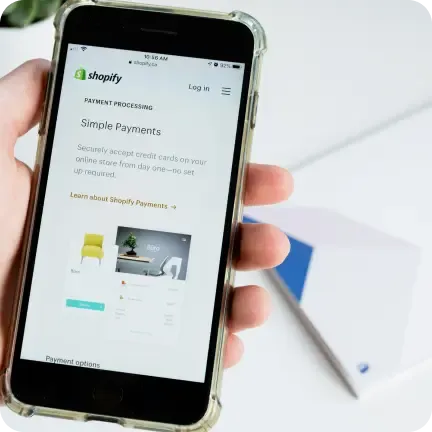
Hosting, updates, SSL and security are included in the subscription, so you don't pay separately for a server or plugin updates.
Ready-made themes to choose from
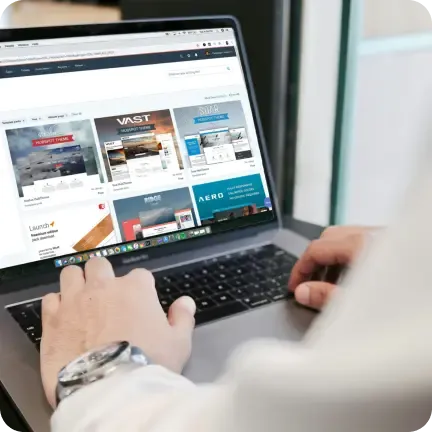
The official Shopify Theme Store has free and paid themes that can be adapted to your brand's colors and typography.

Apps from the Shopify App Store
The Shopify App Store has apps for invoicing, shipping, reviews, loyalty programs and integrations with your business systems. We pick only the ones your store really needs, because some of them charge a monthly fee.
Selling on multiple channels
You can also sell your products on social media, on marketplaces, in AI assistants and in person with Shopify POS.
Shopify support around the clock
Shopify keeps the platform running and its support team is available 24/7. We handle changes to the store itself, such as new sections or apps.

Marketing built into the store
Shopify comes with built-in email marketing, discount codes, gift cards and abandoned cart recovery, and you can set titles and descriptions for Google on every product.
Our Shopify ecommerce development projects
Selected online stores we have designed and built for our clients.








Process



Building a Shopify store starts with the product catalog

Before we design the home page, we work out how a customer gets to a product: through collections, filters or search. That structure decides how many clicks stand between them and the cart, and it is hard to change after launch, so it comes first.
Collections, variants and filters
A store with fifty products and a store with five thousand need different structures. A small catalog gets by with collections and a clear home page; a large one needs filters on the attributes customers actually care about: size, material, purpose or compatibility with a machine model. A product that comes in several versions, such as colors or capacities, is set up as variants of one product page, so nobody has to compare ten pages of the same massage chair. We import the finished catalog from a spreadsheet, so no one types products in by hand.
Collection names come from the way customers talk, not from the manufacturer's price list: people search for a "massage chair", not a "relaxation device".
Product photos and descriptions
The biggest part of the work on a store happens on your side: you have the photos, the prices and the product knowledge. At the start of the project you get a list from us of what to prepare: photos in one style and format, product descriptions that answer the questions customers ask in person, and the company details for invoices and your store policies. We write page titles and descriptions for Google, fill in image alt text and make sure every product has what Shopify needs: a price, inventory and a weight for shipping rates.
Test orders and launch
Before launch we go through the store the way a customer would: on a phone and on a desktop, in the popular browsers. We place test orders with every payment and shipping method, check the emails the store sends after a purchase and confirm that the invoice reaches the customer. Finally, we sit down with your team in the Shopify admin and show how to add products, handle orders and returns and create discount codes. After that session you run the store yourself, and bigger changes come to us under the monthly support plan.
Tools we use to design and build online stores
Below are the tools we use to design and build online stores and connect them with other systems. If your company works with different tools, we will adapt to them.








Shopify Plus for high-volume stores
A plan for large stores, with a customizable checkout and expansion stores for other markets. We can help you decide whether you need it.


We are an authorized Selly reseller
Selly is a Polish ecommerce platform. For over 15 years we have been designing templates and custom store designs for it.
Questions and answers
How much does it cost to build a Shopify store?
A Shopify store from Hilvec starts at $10,000 for a simple setup on a ready-made theme. The price goes up mainly with a custom UX/UI design, integrations with your business systems such as an ERP or inventory system, additional languages and markets, and features that require paid apps. Your Shopify plan and any paid apps are billed separately, directly by Shopify.
How much does it cost to run a Shopify store?
Shopify plans start at $29 per month on the Basic plan billed yearly, and the Grow plan costs $79 per month (Shopify pricing, October 2026). Payment fees come on top, for example 2.9% + 30¢ per online card payment with Shopify Payments on Basic, plus any paid apps. Our support after launch is billed separately as a monthly support plan.
Does Shopify issue invoices?
Shopify sends order confirmations, but it does not create formal invoices on its own. We connect an invoicing app from the Shopify App Store that generates a PDF invoice for every order, numbered the way your accountant needs, and emails it to the customer. We also add a field for the customer's company details at checkout and set up tax rates for every region you sell to, so each invoice shows the right tax.
Shopify theme or custom store design?
A theme is enough when you want to start selling fast and your products don't need an unusual presentation. Themes from the Shopify Theme Store are free or a one-time purchase, and we adapt them to your brand: colors, typography and section layout. A custom design makes sense when your brand needs to stand out or the product page and cart have to work differently than in ready-made themes. In that case, we start with UX/UI design.
Can a Shopify store sell in several countries and currencies?
Yes. With Shopify Markets you can translate the storefront, show prices in local currencies and use local domains, and Shopify can estimate duties and taxes at checkout. Local currencies require Shopify Payments. We set up markets, languages and payment methods for each country you sell to, and we configure shipping rates so customers see delivery costs before they place an order.
Can I manage the store myself after launch?
Yes. You manage products, orders, discounts and most content in the Shopify admin, including the mobile app. New sections on the home page are arranged in the theme editor, with no code. Shopify support is available 24/7, and bigger changes, such as new features or apps, are handled under our monthly support plan.
We want to help grow your company no matter where you run it!