

Keeping our own site on Webflow would cost about $650 a year at today's list prices, for a Premium site plan and one extra language. Since November 3, 2026, hilvec.com has run on Astro, and hosting costs us nothing. It's a nice number, but it isn't why we left. And it shouldn't be the only reason you compare Webflow alternatives either.
The good news is that almost everything Webflow does has a solid replacement. The bad news is that no single tool replaces all of it, and a site with a CMS doesn't leave Webflow with one click.
We've been a Webflow Certified Partner since 2024, we still look after client sites built in Webflow, and this autumn we moved our own. This guide covers why companies start looking, when we'd tell you to stay, the alternatives sorted by the job they do, our own move in numbers and a checklist for leaving without losing search traffic.
Why companies look for Webflow alternatives in 2026
The 2026 price change started a lot of these searches, but price is rarely the whole story. Most companies that leave have more than one reason.
The new price list. On May 13, 2026, Webflow merged its CMS and Business plans into one Premium plan for $25 a month billed yearly, or $39 billed monthly. Basic costs $15 a month billed yearly, or $25 billed monthly, and now allows 300 static pages instead of 150. Premium includes 20,000 CMS items in 40 collections and 50 GB of bandwidth, half of what the old Business plan had. Existing sites switch to the new prices at renewal: most from June 29, and sites in Freelancer and Agency workspaces or on legacy pricing from November 16, 2026.
Costs on top of the site plan. Team seats are billed through separate Workspace plans, which now also carry the AI credits. Every extra language needs Localization, which costs $9 a month for Essential and $29 for Advanced. Our own site in two languages would have cost more than twice the Premium price before a single extra seat.
CMS limits. Twenty thousand items cover most marketing sites. They get tight for content-heavy ones, such as large blogs, directories or catalogs, and 40 collections put a ceiling on how you can structure content in the first place.
Lock-in. A Webflow site with a CMS can only run on Webflow's hosting. You can export the HTML and CSS, but the export leaves out the CMS, forms, e-commerce and every language except the primary one. We explain what that means for a move further down.
Who can edit the site. Webflow's Designer is built around the way front-end developers think, with classes, components and nested boxes. That's its strength for designers and its weakness for marketing teams, which often end up waiting for the one person who understands how the classes and components fit together. The simpler Editor handles text and CMS items, but bigger changes still go back to whoever built the site.
AI changed the math. This reason is the newest. AI coding agents such as Claude Code can now build and change a site in code while a person reviews each change. A coded site has become much cheaper to look after, and that weakens the main argument for a visual builder: that you don't need a developer for every change. Webflow sees this too, which is why it's moving closer to code itself.
When staying on Webflow is the right call
Stay on Webflow if your marketing team edits pages in the visual editor every week and likes doing it, your content fits within Premium's limits and nobody on your side wants to own code. For a company like that, a move costs money and time and gives little back.
If the price change is your only complaint, do the math before anything else. Premium costs $300 a year on yearly billing. Rebuilding a site with a CMS on another platform costs much more than that, so the price alone rarely pays for a move.
Webflow isn't standing still either. In September 2026 it announced Source, a platform that puts code at the center of everything a site ships, and Webflow Cloud already runs Astro and Next.js apps next to Webflow sites. Source is still in a limited preview, so it's too early to plan around it, but Webflow is clearly heading where many of its alternatives already are. We wrote more about that shift in our guide to what a Webflow developer does in 2026.
We still look after Webflow sites for companies that fit this description. Our Webflow agency page explains how we work with them.
Webflow alternatives at a glance
The table compares the alternatives we'd actually consider for a company website, with Webflow as the point of reference. Prices come from each tool's pricing page in November 2026 and assume yearly billing, where they're lowest. For a wider comparison that also covers Shopify and cheap hosting builders, see our guide to the top website builders in 2026.
Two columns matter more than the price. "Who edits content" decides whether the switch makes your team faster or slower. "Can you take the code with you" decides whether you'll be reading an article like this one again in three years.
The best Webflow alternatives by the job they do
There's no single best Webflow alternative, because Webflow does several jobs at once. It's a design tool, a CMS and a hosting company, and for some sites also a store. Pick the replacement for the job your site does most.
Framer is better than Webflow for design-led landing pages
Framer beats Webflow when the site is mostly design and motion and the content stays small. It grew out of a prototyping tool, so animations, scroll effects and precise layouts take minutes where Webflow's interactions panel can take an afternoon. For a product launch or a startup's first marketing site, that speed makes a real difference.
Pricing is per site. Basic costs $10 a month and Pro $30 on yearly billing, and every extra editor adds $20 a month. Pro includes 150 pages, 10 CMS collections and 2,500 CMS items, an eighth of the items in Webflow Premium. More of each is a paid add-on.
For anyone leaving Webflow, the catch is that Framer doesn't solve lock-in. There's no official code export, and room for more content costs extra on top of the plan. Moving from Webflow to Framer swaps one closed platform for another, so it makes sense when design matters more than content, and not when you're leaving because of limits.
WordPress trades Webflow's polish for plugins
WordPress gives you the most freedom and asks for the most upkeep. The self-hosted version from WordPress.org is free software you install on any hosting, so the site, the database and the code are yours. WordPress.com is the hosted version, from $4 a month on yearly billing, with more control on the higher plans.
What you gain over Webflow is choice. There are tens of thousands of plugins and themes, and far more people know WordPress than Webflow, which makes it easier to find help or hire. Teams that want a visual editor usually add a page builder such as Elementor.
What you give up is Webflow's tidiness. Every plugin is one more thing to update, and a site assembled from many of them tends to get slower and harder to keep secure. If you choose WordPress, choose a lean theme, keep the plugins to a minimum and make sure someone looks after updates every month.
Wix and Squarespace suit a site you update a few times a year
For a small business with a handful of pages, Wix and Squarespace cost about the same as Webflow and ask much less of you. Wix Light costs $17 a month, and Core, the first plan that takes payments, $29. Squarespace starts at $19 a month for Basic. Both include hosting, templates and support, and both are made for owners who don't want to think about the website between updates.
You get less design control than in Webflow, and neither lets you take the code with you. For a company that left Webflow because it was too much tool for a simple site, that's fine. For one that left because it needed more, it's a step in the wrong direction.
Webstudio is the closest open-source Webflow alternative
If you like how Webflow works but not where your site lives, look at Webstudio. It's a visual builder with CSS control close to Webflow's, and its code is open source. You can host the builder and your sites yourself, or use Webstudio Cloud, whose free Hobby plan covers up to five custom domains and 10,000 page views a month.
It's younger than Webflow, with a smaller community and fewer templates. It also has no built-in CMS in the Webflow sense, so content comes from an external one that you connect. For a design-minded team that wants a Webflow-like canvas with an exit door, it's the most direct swap.
Astro with a CMS gives you code you own
Astro is what we moved our own site to, and what we recommend to companies that have outgrown builders. It's a free web framework, so a developer builds the site once, around your content. Pages are generated ahead of time as plain HTML, which makes a fast site the default and lets you host it for free on services such as Cloudflare.
Content lives in a CMS. For client sites we usually recommend Sanity, where the team edits content in Sanity Studio or simply asks an AI assistant to make the change. Sanity's free plan includes 20 seats and 10,000 documents, and the Growth plan costs $15 per seat a month. Payload is an open-source CMS you host yourself, and smaller sites can keep content in files next to the code, the way we do.
The trade-off is the canvas. Nobody drags sections around anymore. Layout changes and new sections go through code, which today usually means an AI agent such as Claude Code writing the change and a person checking it on a preview before it goes live.
Why we moved hilvec.com from Webflow to Astro
We didn't leave because Webflow got worse. For years it was our main platform for marketing sites, and several of the sites we look after still run on it. We left because the way we wanted to work on our own site had changed.
Our site has two languages and a lot of content, and it changes every week. We wanted all of it to be files in one repository, where an AI agent can make a change, automated tests can check it and we can look at it on a preview before anyone else sees it. That's possible with a visual builder in pieces. With a coded site, it's simply how everything works.

The price wasn't the reason. We wanted a site we could change by describing what we need, check on a preview and publish once the tests pass. That's easier when the whole site is code.
What we gained
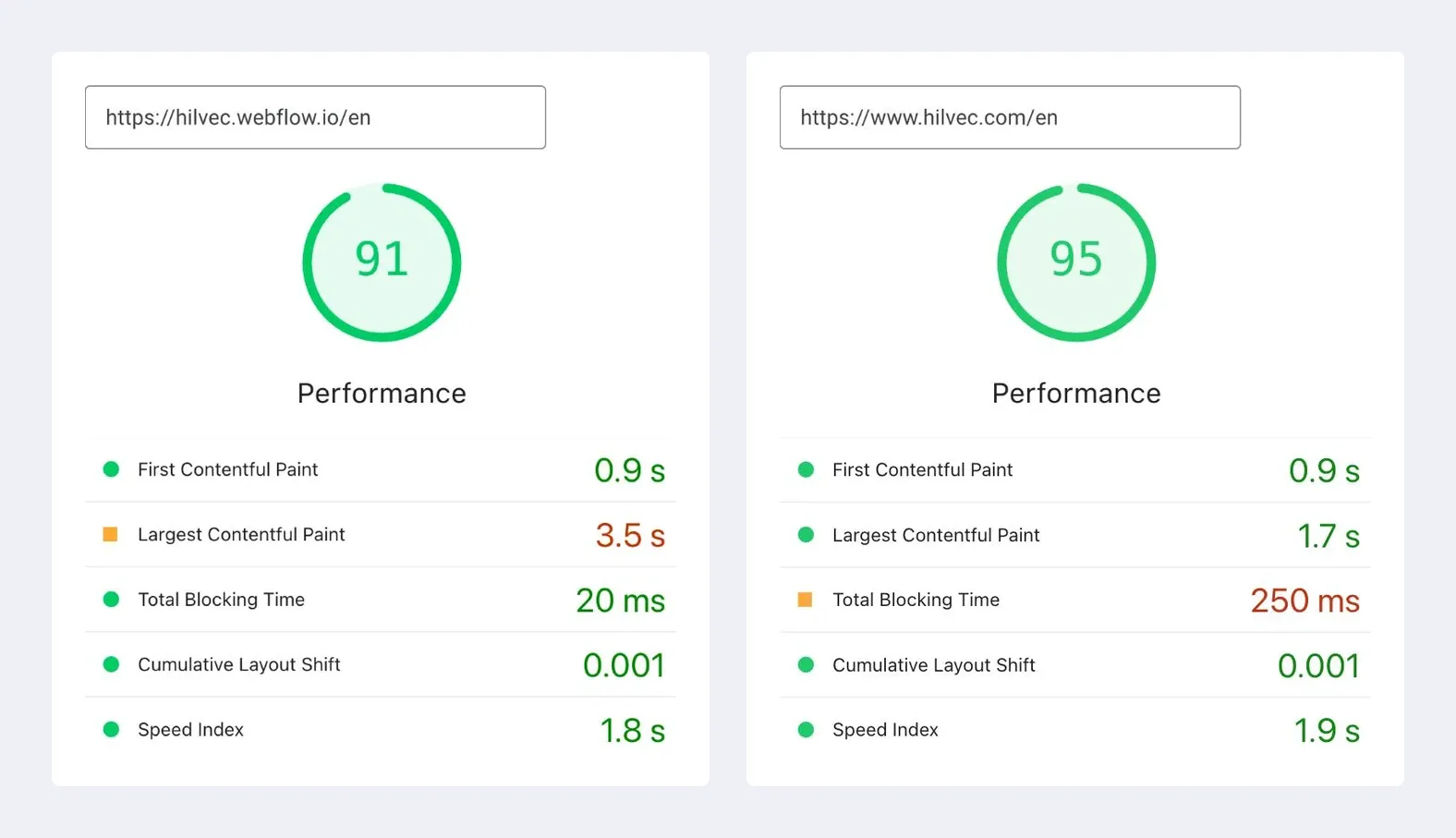
Speed, and less of a difference than you'd expect. The internet is full of comparisons in which Astro beats Webflow on speed. In our experience the platform is rarely the reason. Slow Webflow sites are usually slow because of how they were built, with too many animations, effects added for show and builders without much experience. A well-built Webflow site is almost as fast as the same site in Astro, and our own is a good example. On our English homepage, PageSpeed Insights gives 91 on Webflow and 95 on Astro, with the same analytics and cookie banner on both. The biggest difference is how fast the main content appears on a phone: 3.5 seconds on Webflow and 1.7 on Astro. If your Webflow site is slow, a careful rebuild in Webflow will get you most of the way there.
A safety net on every change. Each change goes to its own branch with its own preview address. Before anything reaches the live site, more than 250 automated tests check it, from titles, descriptions and language pairs to broken links, images without alt text and links to redirected addresses. A failed test stops the deployment, and the live site stays on the previous version.
Content with a history. Posts and case studies are text files in the repository, so every change has an author, a date and a way back. Drafts are visible on previews and never on the live site.
An AI agent that does the typing. Most changes, from a new section on a service page to a refreshed blog post, start as a request to Claude Code. It edits the files, runs the tests and opens a preview, and a person reads the result and decides whether it goes live. This article went through the same process.
Lower running costs. Static files are served on Cloudflare's free plan, the small Worker that handles forms and the language redirect fits within the free 100,000 requests a day, and contact form emails go through Resend's free plan of 3,000 emails a month.
What we gave up
The canvas. Nobody on our team drags a section into place anymore. If you think in layouts rather than in descriptions, that's a real loss, and it's the main reason we don't recommend Astro to every company.
Features that came in the box. Webflow gave us forms, localization, hosting and interactions out of the box, and we had to rebuild each of them. Forms now run on a Cloudflare Worker with Turnstile spam protection and Resend. Polish and English versions use our own routing with translated URLs. The 144 interaction triggers and 39 animations were read from Webflow's published code and rebuilt with GSAP.
Someone else's responsibility. On Webflow, hosting, security certificates and uptime were Webflow's job. Now DNS, the Worker and the build are ours to answer for, even though Cloudflare runs the servers.
Time. The move took five days from the first commit to the domain switch, but only because we kept the design exactly as it was and an AI agent wrote most of the code. A redesign at the same time would have taken much longer.
How to move off Webflow without losing traffic
Most of the risk in leaving Webflow sits in the old addresses. Every page Google knows has to keep working, or redirect permanently to its new address, with the same titles, descriptions and language tags. Before you plan anything else, know what Webflow will and won't give you.
This is the order we followed:
- List every address. Start with the sitemap, then add pages left out of it, such as thank-you pages, landing pages and old redirects. Our sitemap had 208 addresses, and we found 14 more outside it.
- Export the content with its images. Use the CSV export or Webflow's API. We used the API with a read-only token, turned every item into a file and had a test compare each post and case study with Webflow: text, links, images and headings. Download the images as well, so the new site doesn't depend on Webflow's servers.
- Keep the URLs or redirect them. Keep the same addresses wherever you can. Where you can't, add a 301 redirect, and carry over the redirects already set in Webflow. Check small details too, such as trailing slashes, which Webflow redirects in its own way.
- Copy the SEO along with the text. Titles, descriptions, canonical tags, hreflang for language versions, social images and structured data all have to match. We compared every one of them on every page before the switch.
- Rebuild what runs in the background. Forms, analytics, the cookie banner and integrations, such as newsletter sign-ups or a booking tool that sends people back to a thank-you page on your site.
- Switch, test again and keep a way back. Change the DNS, run the address check against the live domain, resubmit the sitemap in Google Search Console and keep the Webflow plan for about a month. If something goes wrong, going back is one DNS change.
Search Console read our new sitemap on the day of the switch. Rankings take weeks to settle after a move, so we keep an eye on 404 errors and indexing, and the old Webflow site waits in the background until we're sure we won't need it.
More questions about Webflow alternatives
Is Webflow still popular?
Yes, though it's a niche tool next to WordPress. According to W3Techs, Webflow ran about 0.8% of all websites in October 2026, slightly less than a year earlier, and it's more common among high-traffic sites than across the web as a whole. Wix (4.2%) and Squarespace (2.4%) run many more sites.
Is Elementor better than Webflow?
Elementor is the better choice if you're already on WordPress and want to stay there. It's a page builder plugin that adds drag-and-drop editing to WordPress, so your team gets a visual editor without giving up its plugins. Webflow produces cleaner code and needs no plugin updates, which usually means a faster and more stable site. For a new site with no WordPress history behind it, we'd pick Webflow over WordPress with Elementor.
Can I keep my Webflow design when I leave?
Yes, if you move to a coded site. A developer can rebuild the design from the exported HTML and CSS, and it can come across unchanged. We kept ours exactly as it was and compared screenshots of every page, on desktop and phone, between the old and the new site before the switch. Builders such as Framer, Wix or Squarespace can't import a Webflow design, so moving to one of them means rebuilding the design by hand.
Leave Webflow for a reason, not a price tag
A good reason to leave sounds like a sentence about how your team works, not about the invoice. "Our marketers wait a week for every landing page." "Our content no longer fits the CMS." "We want to own the code and let an AI agent take the routine work." If you can say something like that about your site, pick the alternative that fixes that exact problem and use the checklist above to move without losing traffic.
If your sentence points to Astro, that's the move we made ourselves and the one we now make with clients. Here's how we work with companies on Astro sites.
And if the honest answer is to stay on Webflow a little longer, that's a good outcome too.