

At first, everything is simple. One website. One language. One market. The content is polished, SEO starts to gain traction, leads come in regularly. The website does exactly what it’s supposed to do.
Then someone asks a seemingly harmless question: “If this works here, why not expand?” Sometimes it’s a new market opportunity. Sometimes it’s the first international customer. Sometimes it’s a new hire joining from abroad. And sometimes it’s an investor asking, almost casually,“Is your site ready to operate in English?”
That’s usually where the first mistake happens.
Because website localization rarely starts with strategy. It usually starts with a shortcut: “Let’s make English the base and adapt from there.”
And that’s when things get complicated.
A website isn’t a Word document. It’s structure, SEO, URLs, CMS, forms, system messages, microcopy, sales content, and cultural context. The moment you add another language, every one of those elements starts behaving differently.
This is exactly why Webflow Localization becomes relevant when a company stops treating its website like a brochure and starts using it as a tool for growth.
Webflow didn’t introduce Localization to “make things nicer.” It introduced it because manual, improvised approaches to multilingual websites simply stop working at scale.
Which leads to a question worth asking early on: Do you want a website in multiple languages or do you actually want to communicate with multiple markets?
The difference between those two approaches is substantial. And that difference is where Webflow Localization starts to make sense.
What is Webflow Localization and why it’s not just website translation
When people talk about multilingual websites, terminology gets messy very quickly. Localization, translation, language versions, separate sites, subdomains, everything tends to get lumped together as if it meant the same thing.
It doesn’t.
Webflow Localization is often mistaken for a translation tool. That’s the first point where it’s worth slowing down. If you think of it simply as a way to “convert content into another language,” you’ll probably miss most of its value.
This solution was designed for companies that want to communicate with more than one market without losing control over structure, consistency, and scale. It doesn’t simplify decisions. It makes them explicit.
Because effective multilingual websites are rarely carbon copies.
Headlines change. Calls to action change. Sometimes even the order of sections changes. The product might be the same, but the user and the context isn’t.
Another common misconception is the classic approach:
“Let’s just create a separate English website.”
Technically, that works. Strategically, it often leads to fragmentation. Content drifts out of sync, updates become inconsistent, and SEO starts competing with itself instead of compounding.
Webflow Localization addresses that problem at its root. Not by automating translation, but by enforcing a shared structure while allowing controlled differences.
And that’s why it only really makes sense once a website stops being “just nice to look at” and starts functioning as a sales, marketing, and expansion platform.
How Webflow Localization works under the hood
For this approach to work in practice, localization in Webflow had to be built on a clear, opinionated system. Not to expose complexity, but to remove the need for workarounds and improvisation later on.
Everything starts with a single reference point: the primary locale.
Primary locale: what it is and why it matters
The primary locale is the base language version of your website. It’s where the structure is defined, where the CMS schema is created, and where the initial content logic is established. Every other language version builds on top of it.
This decision is often underestimated and it’s one of the most common mistakes in multilingual setups.
Companies tend to choose the primary locale quickly, based on what feels “current” rather than what’s strategically sound. Many companies start in a single market and later restructure around English as their primary operating language. Technically, it can be changed later. Strategically, it creates friction.
Webflow treats the primary locale as the source of truth. Other locales are variations of that foundation, not equal, independent websites. That distinction is subtle, but it has far-reaching consequences for how your site scales.
Locales in Webflow: why they’re not copies of your site
Each additional language in Webflow exists as its own locale. And this is critical: a locale is not a cloned version of your website.
Instead, it’s a layer that sits on top of a shared structure.
The layout stays consistent. CMS collections remain shared. URL logic stays predictable. What changes is the content, selectively and intentionally. In one locale, you might only adjust copy. In another, you might adapt SEO elements. In others, you might rewrite sales messaging entirely or hide sections that don’t make sense for that market.
All of this happens without breaking the project or duplicating entire pages.
That’s the real difference between localization as a system and localization as a workaround.
URL structure for multilingual websites: clarity over improvisation
URL management is another area where localization either scales cleanly or becomes a long-term problem.
Webflow Localization uses language-based folders by default for example /en, /de, /fr. This approach is easy to understand for users, predictable for search engines, and manageable as the site grows.
More importantly, each locale can define its own slugs and URL structure when local SEO requires it. That’s where localization stops being restrictive and starts supporting real visibility in different markets.
You’re not forced into one-size-fits-all URLs. You’re given a framework that stays consistent while allowing market-level optimization.
What happens behind the scenes and why it matters
Without diving into technical details, Webflow maintains a single structural backbone and stores differences at the locale level. That prevents unnecessary content duplication, keeps the CMS clean, and reduces the risk of one language version drifting away from the others over time.
This approach becomes especially important in content-heavy projects: blogs, resource libraries, service pages, or product documentation. In those cases, manual multilingual management quickly turns into a maintenance burden.
That’s why Webflow Localization shows its real value not on small brochure sites, but on websites where content evolves continuously and supports growth over the long term.
Localizing static content: where translation most often breaks conversion
If there’s one place where multilingual websites fail most often, it’s here. Not in the blog. Not in SEO. But in static content, the elements users see and interact with first.
Headlines. Buttons. Forms. Short messages designed to move someone closer to a decision.
These are the pieces that seem easiest to translate and are the easiest to get wrong.
Why? Because short copy leaves no room for error. A headline that works perfectly in one language can sound too aggressive, too vague, or simply off in another. There’s no context to hide behind. Every word carries weight.
Calls to action are a good example. A button like “Contact us” has dozens of reasonable alternatives. But only a few of them align with user intent in a specific market. That’s not a nuance. It’s the difference between a click and a bounce.
Localization starts affecting conversion the moment static content stops being treated as interchangeable text.
Headlines, CTAs, and forms as market signals
Static elements don’t just communicate information. They signal tone, intent, and expectations.
A headline can position a product as enterprise-grade or lightweight. A CTA can feel like an invitation or like pressure. A form can feel approachable or intrusive, depending on how it’s framed.
What works in one market doesn’t automatically translate to another, even when the language is the same. The words might be correct, but the intent can drift.
This is where localization stops being cosmetic.
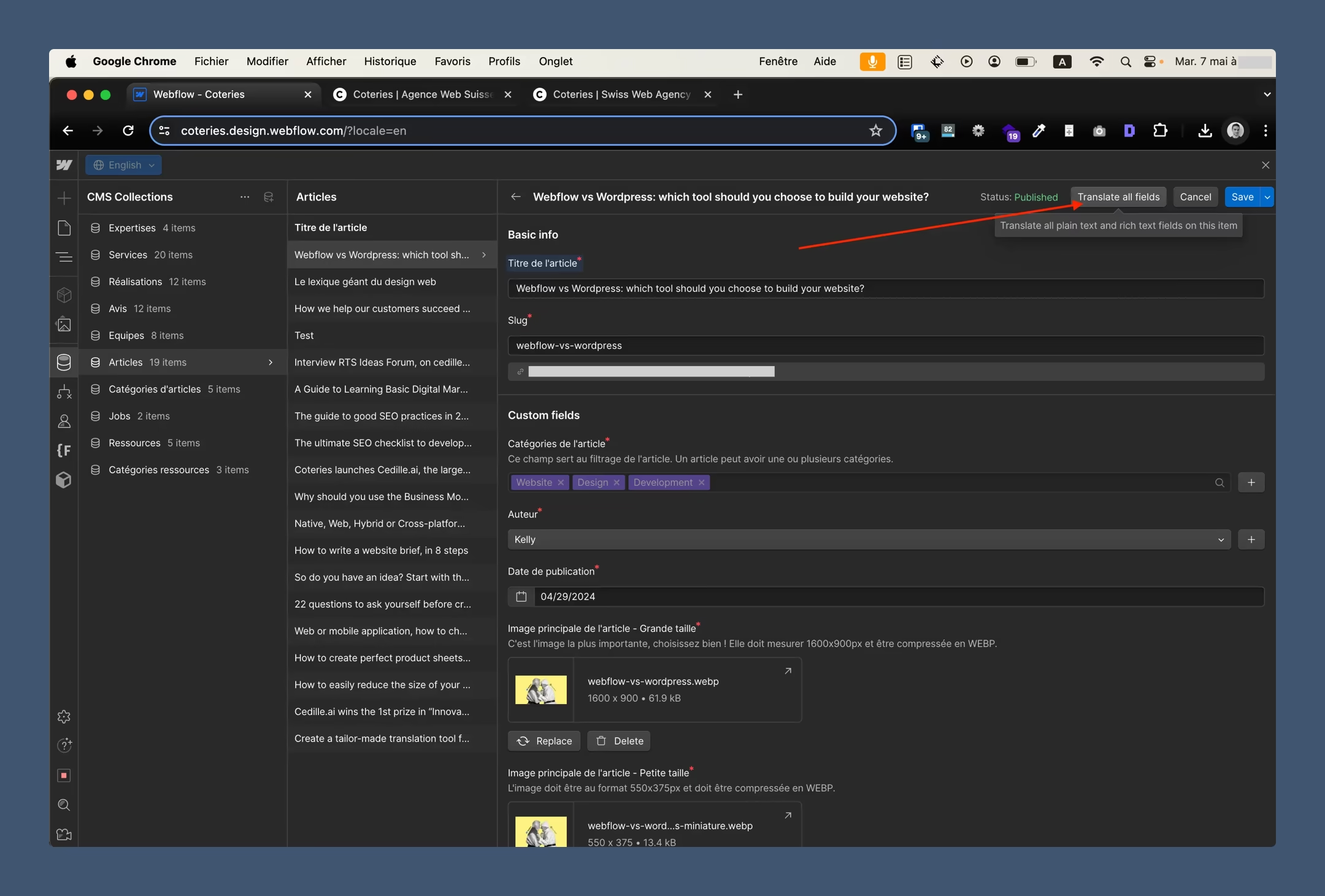
Instead of duplicating sections or creating parallel layouts, Webflow Localization allows static text to be adapted per locale while keeping the structure intact. Headlines can change without breaking layout. CTAs can be rewritten without duplicating components. Form messages can be adjusted to match cultural expectations rather than literal phrasing.
That flexibility is what makes localization usable at scale, especially when conversion matters.
Microcopy: small text, outsized impact
Microcopy is rarely discussed in briefs, yet it often decides how a page feels in critical moments.
Placeholders in form fields. Validation messages. Helper text under buttons. Short explanations next to inputs. These elements show up precisely when users hesitate or evaluate risk.
In many multilingual projects, microcopy is either auto-translated or ignored altogether. The result is predictable: the site looks “global,” but behaves awkwardly when users try to interact with it.
Treating microcopy as first-class content changes that dynamic. When these elements are localized intentionally, they reinforce clarity and trust instead of introducing friction.
Users may not consciously notice good microcopy but they immediately feel bad microcopy.
Same meaning, different role
There’s another layer that often gets overlooked: the same sentence can serve a different purpose in different markets.
In some contexts, trust is built through experience and proof. In others, through clarity and immediacy. A message that reassures users in one market may feel redundant or overly cautious in another.
Localization makes room for those differences. It allows teams to stop copying narratives one-to-one and start adapting communication to how decisions are actually made in each market.
That’s where the gap becomes clear, between a website available in multiple languages and a website designed to operate across multiple markets.
Webflow CMS and multilingual content: where localization either scales or breaks
If static content is a test of localization quality, CMS is a test of maturity. This is where most multilingual websites either start to scale cleanly or slowly fall apart.
Blogs, case studies, service pages, and dynamically generated landing pages aren’t created once and forgotten. They evolve constantly. New content is added. Old content gets updated. Messaging changes as the business grows.
How you localize this layer determines whether multilingual content becomes an asset or an operational burden.
One CMS collection, multiple language versions
The most important thing to understand is deceptively simple: in Webflow, you don’t create separate CMS collections for each language.
You work with a single collection, where each item can have different content versions depending on the locale.
That means one blog post, one case study, one service page but multiple language variants managed in one place. Structure stays consistent. Relationships between content remain intact. You don’t end up wondering which version is “the real one” six months later.
This approach reduces duplication, lowers maintenance overhead, and keeps long-term content strategy manageable.
Multilingual blogs without operational chaos
Blogs are usually where multilingual setups get stress-tested first.
With Webflow Localization, content doesn’t have to be rolled out across all markets at the same time or at all. You can release content market by market, adapt headlines and SEO elements per locale, and adjust tone and depth depending on audience expectations.
That flexibility matters.
Not every article deserves to exist in every language. Some topics are market-specific. Others are exploratory. Localization works best when it supports intentional decisions rather than enforcing uniformity.
Case studies and service pages: localizing context, not just language
Case studies are a particularly good example of why translation alone doesn’t work.
What builds credibility in one market may be irrelevant or even confusing in another. Client names, references, industry context, and proof points often need to be reframed, not translated.
A multilingual CMS setup makes that possible. You can adapt narratives, swap testimonials, or disable certain entries for specific locales without breaking the structure of the site.
At that point, the CMS stops being a content repository and starts functioning as a communication tool.
Knowing what not to translate
One of the most overlooked decisions in localization is deciding what not to localize.
Not every piece of content adds value in every market. Not every article supports SEO across languages. Not every service page makes sense outside the primary market.
Webflow Localization gives teams the flexibility to localize selectively, focusing effort where it actually contributes to visibility, credibility, or revenue. That’s where localization stops being a cost center and becomes a strategic investment.
SEO in Webflow Localization: indexing, structure, and market-level intent
SEO in Webflow for multilingual websites is both overrated and underestimated.
Overrated, because many teams assume that “setting up languages correctly” is enough.
Underestimated, because the consequences of poor decisions often show up months later - right when the site is supposed to start delivering results.
Search engines don’t infer intent. They read structure. And with multiple language versions, that structure has to be unambiguous.
This is where Webflow Localization stops being a convenience feature and starts functioning as infrastructure.
Search engines need clarity, not assumptions
In a well-designed multilingual setup, different language versions of the same page don’t compete with each other. They support each other.
That distinction is critical. In many traditional multilingual implementations, language versions end up duplicating content unintentionally. Even when everything looks correct on the surface, search engines struggle to understand which version should rank and for whom.
Webflow Localization is built around the assumption that each locale represents a specific market context. Language versions are clearly defined, related, and scoped. That gives search engines a strong signal: this version is meant for this audience, in this language, in this market.
That’s not a technical detail. It’s foundational.
When that clarity is missing, search engines start guessing. And when they guess, rankings tend to suffer.
URL structure that scales with content
URL management is another area where multilingual SEO often breaks down.
With Webflow Localization, each locale operates within a predictable, structured URL space. There are no random parameters, no improvised redirects, no fragile workarounds. The structure is consistent and consistency is exactly what search engines expect as sites grow.
More importantly, localization doesn’t force uniformity. Each locale can define its own slugs, tailored to how users actually search in that market. That’s where localization moves beyond technical correctness and starts supporting real visibility.
Because good multilingual SEO isn’t about translating keywords. It’s about understanding that search intent shifts from market to market - even when the underlying problem is the same.
Local SEO is not a checkbox
This is where many projects quietly underperform.
Translating meta titles and descriptions isn’t localization. It’s formatting. Real localization means adapting search intent. What users type into search engines varies by market, terminology, and expectations.
Webflow allows SEO elements - titles, descriptions, headings - to be defined per locale. That flexibility makes it possible to compete locally instead of simply being present globally.
A poorly localized site may look correct from an SEO perspective.
A well-localized one competes market by market.
SEO as an ongoing process, not a one-time setup
One final point that’s often overlooked: multilingual SEO is not something you “set and forget.”
As new content is published, offers change, and messaging evolves, each locale develops its own rhythm. Forcing everything to stay perfectly synchronized often creates more problems than it solves.
Webflow Localization doesn’t require artificial alignment. It allows SEO to evolve naturally per market, while still maintaining a shared structural backbone.
That balance between consistency and autonomy is what makes multilingual SEO sustainable over time.
Automatic translations in Webflow: when they help and when they hurt
Automatic translation is tempting for one simple reason: speed.
A few clicks, a short wait, and suddenly your entire website exists in another language. On the surface, everything looks fine. The structure holds. The content is there. The project feels “done.”
That feeling is misleading.
Webflow Localization allows teams to start with automatic translation and that’s not a flaw. It’s a tool. The problem appears when that tool is treated as a final outcome rather than a working draft.
Because automatic translation rarely fails linguistically. It fails communicatively.
Correct language, wrong intent
Machine translation usually produces grammatically correct text. The meaning is technically accurate. But tone drifts. Context disappears. Calls to action stop feeling like invitations and start sounding like instructions.
Sales-oriented copy is particularly vulnerable. Nuance, emphasis, and positioning, elements that were refined over time in the original language - flatten out almost immediately.
Headlines are where this becomes most visible. The same words, translated into another language, can completely shift the weight of a message. What feels confident and direct in one language may come across as overly formal, distant, or uncomfortably aggressive in another.
Automatic systems don’t detect that shift. They don’t know whether you’re selling a high-touch service, a self-serve SaaS product, or an enterprise solution. They don’t understand where the user is in the decision process.
They translate words, not intent.
Automation as a starting point, not a destination
Used intentionally, automatic translation can be valuable.
It’s an efficient way to create a first draft, assess scope, test content length, and identify where messaging breaks down across languages. As an operational shortcut, it has a place - especially in early-stage localization.
But websites that are expected to perform across markets require more than technically correct copy. They require deliberate decisions: what you say, who you say it to, and how directly you say it.
The strongest multilingual projects follow a different order than the one automation encourages. They define positioning first. They decide what matters in each market. Only then do they use automation where it genuinely saves time and return to the content that carries the most weight.
Why flexibility matters
One of the strengths of Webflow Localization is that it doesn’t lock teams into automation. It allows automatic translation where speed is useful, and manual refinement where precision matters.
That balance is critical.
It lets teams move quickly without committing to mediocrity. Localization can start fast but it doesn’t have to end there.
UX and conversion across markets: why the same website doesn’t perform the same way everywhere
At this point, many teams feel like the hard work is done.
Languages are set up. Content is translated. SEO is configured. The website looks consistent across versions. And then the results come in traffic grows, but conversions don’t follow.
This isn’t a language problem.
It’s a UX problem.
Multilingual websites are often designed as if users in different markets make decisions the same way. In reality, even small differences in expectations, trust signals, and decision timing can change outcomes significantly.
Same structure, different decision paths
A layout that performs well in one market can underperform in another even when the content is technically correct.
In some markets, users want more context before taking action. They look for proof, detail, and reassurance. In others, they respond faster to clarity, simplicity, and a direct value proposition. The same sections, in the same order, with the same calls to action can lead to very different results.
That’s where localization moves beyond text.
A well-designed multilingual website doesn’t assume uniform behavior. It assumes that the same problem may require a different path to a decision, depending on the market.
Localizing UX without breaking structure
One of the strengths of Webflow Localization is that it allows teams to adapt user experience without fragmenting the site.
You can adjust emphasis without redesigning pages. You can change messaging hierarchy, simplify or expand forms, and shift focus between arguments all while keeping the underlying structure intact.
Calls to action are a good example. A CTA that performs well in one market may be ignored in another not because it’s poorly translated, but because it appears at the wrong moment in the decision process.
Forms behave the same way. Field count, phrasing, and confirmation messages all influence whether users complete the next step. Localization at this level treats UX elements as strategic components, not fixed layout blocks.
Conversion doesn’t scale one-to-one with translation
This is an assumption that quietly undermines many multilingual projects.
If you take a converting page and translate it into three languages, you don’t automatically get three converting pages. You get three versions that still need to earn trust, clarity, and momentum within their own context.
A website that merely “looks correct” in multiple languages is rarely enough. A website that guides users toward a decision in their specific market context is what actually performs.
That distinction is subtle but it’s where localization starts influencing revenue, not just reach.
Costs, constraints, and when Webflow Localization stops being an obvious choice
This is usually the point in localization discussions where the room goes quiet. Not because the topic is complex but because it’s uncomfortable to address too early.
That’s a mistake.
**Webflow Localization isn’t a free add-on. And that’s a good thing. It fundamentally changes how teams work with content, structure, and scale. Naturally, the cost grows with the size and ambition of the project.
Every additional language isn’t just more copy. It’s more responsibility: for consistency, SEO performance, UX decisions, and ongoing maintenance.
Scale without strategy creates friction
Problems start when the number of locales grows faster than the strategy behind them.
A website in two or three languages is usually manageable. Seven or eight languages is a long-term commitment. Localization doesn’t end when a new version goes live - it starts the day after, when content updates, new pages, blog posts, and messaging changes need to be handled across markets.
This is where one of the most common limitations becomes visible: localization requires process.
Without clear ownership who writes, who reviews, who approves, who decides what goes live in which market even the best tooling can’t prevent confusion. Webflow Localization doesn’t replace decision-making. It exposes whether it exists.
Not every business needs localization immediately
There’s also a strategic boundary worth acknowledging.
Some businesses benefit naturally from multilingual websites. Others pursue localization more out of ambition than necessity. If international traffic is minimal and sales still close locally, a complex language structure may add more overhead than value.
That doesn’t make Webflow Localization the wrong choice. It simply means timing matters.
In most cases, localization becomes a strong investment when:
- the website already supports sales or lead generation,
- content is actively maintained and expanded,
- international markets are a goal, not an experiment.
Before that, localization can be exploratory. After that, it becomes infrastructure.
Localization as an operational decision
This is the key shift.
Webflow Localization isn’t a feature you enable “just in case.” It’s a system designed for teams that expect growth and want to avoid fragmentation six months, a year, or two years down the line.
When that expectation exists, localization stops being an expense and starts being an operational decision, one that affects how marketing, content, and sales collaborate over time.
Who Webflow Localization is best suited for and when it’s better to wait
After observing multilingual implementations over time, one pattern becomes clear: problems rarely come from technology. They come from timing.
**Webflow Localization delivers the most value when a website stops being a static asset and starts functioning as an operational system for marketing and sales.
This is typically the case when:
- content is updated regularly,
- the CMS plays a central role in communication,
- international traffic is not a curiosity, but a source of real opportunities.
In those environments, localization reduces friction. It keeps structure consistent while allowing messaging to adapt where it matters. Teams stop maintaining parallel versions of the same site “by feel” and start working within a single system that clearly distinguishes shared elements from market-specific ones.
This is especially common among B2B services, SaaS companies expanding beyond their home market, and brands investing heavily in content and SEO. For them, localization isn’t a side project, it’s part of the growth strategy.
On the other hand, there are cases where Webflow Localization is introduced too early.
A single-language site, a handful of pages, no regular content production, and the idea of “adding English just in case.” Technically, it works. Strategically, it often results in a neglected language version that adds complexity without delivering value.
Multilingual presence isn’t a goal in itself.
If a website doesn’t perform well in one language, it won’t magically improve in three.
Localization amplifies what already exists, both strengths and weaknesses.
Preparing for Webflow Localization before clicking “Add locale”
This is the step most teams skip and the one that determines whether localization becomes a long-term advantage or an ongoing burden.
Webflow Localization makes it easy to add new locales. A few clicks, a language selected, and the system is ready. Technically, that’s true. Strategically, it’s only the beginning.
Most localization issues don’t come from misconfigured settings. They come from unanswered questions.
What content should actually be localized?
The default answer is often “everything.” In practice, that rarely holds up.
Some blog posts only make sense in a specific market. Some offers are outdated outside the primary region. Some case studies need rewriting rather than translation. Localization starts with selection, not duplication.
Who owns decisions across markets?
Who decides when content is ready for a new locale?
Who reviews it for language quality and commercial effectiveness?
Who owns updates once the site is live?
Localization exposes gaps in process quickly. Without clear ownership, every change multiplies uncertainty instead of clarity.
Is there a real SEO strategy per market?
Not in the sense of technical checkboxes but in terms of intent.
Do you know what people actually search for in each market? Do those keywords support real business outcomes? Multilingual SEO works when it reflects how different audiences search, compare, and evaluate options.
Only when these areas are addressed does Webflow Localization become a meaningful support system.
Webflow provides the framework. It organizes structure and simplifies execution. But it doesn’t make decisions for you and that’s a strength, not a limitation.
Teams that approach localization this way notice the difference quickly. Instead of maintaining language versions, they start managing markets. That shift changes how the website is used and what it’s expected to deliver.
Summary: multilingual websites as strategy, not a checkbox
Many companies start thinking about localization when the first international opportunity appears. That’s a natural trigger.
A better moment is when you ask yourself a more fundamental question:
Do you want to be understood in another language - or actually operate in another market?
Webflow Localization doesn’t answer that question for you. But once you ask it, the system gives you the structure to act on the answer in a sustainable way.
Multilingual websites that perform aren’t built by translating pages. They’re designed by recognizing differences - in intent, behavior, and decision-making and allowing those differences to shape the experience.
When that happens, localization stops being an afterthought. It becomes a strategic capability.
Related articles